* indicates that this field will be described in more detail at the bottom of this document (Much of the text at the bottom will be common to several ini file reference pages).
For more information on how to use INI files in Imatest IT, we recommend the Imatest INI File Reference
For Imatest IT, most of these entries don't need to be entered. Many don't affect Imatest IT results: they control interactive figure displays or figure output formats (figures are often not used in Imatest IT).
| Background | Meaning |
| Yellow | Yellow background: Important to Imatest IT. Parameter and Description are in boldface. [IT] |
| Cyan | Cyan background: Figure settings. (Figures are used infrequently for IT.) [f] |
| Gray | Gray background: For interactive operation. No effect on IT. |
| Clear | Clear background: Results details (units, scaling, etc.) for CSV and JSON output, or not yet categorized. May affect IT results. |
| Notes: Parameters of special interest to IT users are indicated by [IT] and displayed in Boldface. Some entries have extra values (unused; there to make it easy to add more settings). | ||||
| Parameter | Section | Type | Description | Default value(s) |
| acutanceType | sqf | int | Acutance CPIQ [1], Standard SQF [2] | 1 |
| agc16bit | imatest | int | AGC (auto-lighten) dark 16-bit files | 1 |
| anlz_rough | sfr | int | Analyze edge roughness (slight slowdown) | 0 |
| anlz_sqf | sfr | int | Perform Acutance/SQF analysis | 0 |
| aper | sfr | str | Aperture: may be used for ISO sensitivity | |
| areanorm | sfr | int | Normalization for MTF area calculation for secondary readouts 1,2: 1 = unnorml; 2 = normalize to maximum. | 2 2 |
| bayeraw | sfr | int | Bayer RGB format (monochrome-only): 0-5 for [standard monochrome, R, Gr, B, Gb, demosaic] [IT] | 0 |
| brawShift | dcraw | int | Bayer RAW bit shift | 1 |
| CA | sfr | str | Plot Lateral Chromatic Aberration (color images-only)[f] | Max |
| camera | sfr | str | (camera type from EXIF data) | |
| chcontrast | sfr | int | chcontrast(1) is index of chart contrast for calculating gamma when chcontrast(3)=1: | 7 10 0 |
| 1-12 for contrast ratio = [Off 80 50 40 25 20 10 5 4 2 1.414 1.2 1.1]* [IT] | ||||
| closefigs | sfr | int | Close figures after save if 1. May prevent excessive figure buildup, which shows Imatest down.[IT] | 0 |
| continue_on_error | api | int | Continue batch-processing if exception [IT] | 0 |
| CPIQPreset | sqf | int | Height & distance presets for Acutance calculation: [1] None, | 1 |
| [2] Small Print (10 cm height, 25cm dist, 600 DPI), [3] Large Print (40cm height, 75cm dist, 600DPI), [4] Computer Monitor at 100% (60cm distance, 100PPI), [5] 4.5" Cell Phone (5.5cm height, 25cm dist, 330PPI), [6] 30" 4k UHDTV (37.5cm height, 50cm dist, 146 PPI) | ||||
| csvbase_header | sfr | int | 1 or 2 line CSV database header | 2 |
| cyclesper | sfr | str | Plot Edge & MTF | Max |
| cyclesper_value | sfr | int | Index of display unit: 1-13 for | 1 |
| C/P, C/mm, C/in, LW/PH, LP/PH C/mrad, C/deg, C/Objmm, C/Objin, LW/CH, LP/CH, LW/N_PX, LP/N_PX. See /24.1/sharpness#units [IT] | ||||
| debug | api | int | 0 | |
| deconvFile | sfr | str | Deconvolution (chart compensation) file | *.csv |
| deconvFolder | imatest | str | Deconvolution (chart comp.) folder: no filesep at end | C:\imatest\GUIProducts\ Trunk\depends\RTDepends |
| deconvParam | sfr | dec | Deconvolution (chart compensation) settings | 0 0 0 0 0 0 0 0 0 0 0 0 |
| demoz | dcraw | int | Demosaicing algorithm | 1 1 0 |
| derivCorr | imatest | int | LSF derivative correction ISO 12233:2014(D.1) Strongly recommended (may remove) | 1 |
| disable_figs | api | int | No figures in IT [IT] | 0 |
| displayType | sqf | int | Screen [1], Print [2], Ideal [3] | 1 |
| edgecrop | sfr | int | Index of edge display for Edge/MTF plot: 1=default; 2=entire edge; 3={-4,6} pizels; 4={-10,15}; 5={-15,20}; 6-Half edge; 7=Quarter edge [f] | 1 |
| edgerough | sfr | str | Plot Edge roughness [f] | Min |
| emph2 | sfr | int | Emphasize (make bold) secondary readout in Edge/MTF plot [f] | 0 |
| exiftool | imatest | int | EXIF read selection. /24.1/imatest_instructions#exif | 1 1 |
| exiftool(1) = 0 (no EXIF), 1 or 2 (use Phil Harvey's ExifTool), 3 (Matlab built-in). | ||||
| expandplt | imatest | str | Expand fixed-module figures [f] | 1 |
| expert | sfr | int | Expert (1) vs. basic mode (0) for parameters window [int] | 1 |
| fig_display_mode | api | int | Figure generation mode for IT | 0 |
| figsave | sfr | int | Type of figure to save: 1 for png; 2 for fig [f] | 1 |
| filecomb | sfr | int | Combine files if >1 (for signal averaging) | 0 |
| foclth | sfr | str | (focal length from EXIF data. Use for cycles/angle) | |
| folder | sfr | str | Folder for Open image file dialogue box [int] | C:\imatest\GUIProducts\ Trunk\source\ |
| gamma | sfr | str | gamma for linearization {IT] | 0.5 |
| getfileopt | imatest | int | 1 for standard file read dialog; 2 for uipickfiles, which supports batches. [int] | 1 |
| globfold | imatest | str | Use a global folder for reading images, rather than a folder for each module.[int] | Min |
| globsave | imatest | str | Use a global folder for saving results, rather than a folder for each module.[int] | Min |
| heightOrPct | sqf | int | If true [1] image heights are calculated using percentage magnification | 0 |
| ini_file_date | imatest | str | Set to run date in some modules. Informational. UNUSED? | |
| instarun | imatest | int | New cropping indicator [int] | 0 |
| iso | sfr | str | (ISO speed settingfrom EXIF data) | |
| isostd | sfr | str | ISO 12233 standard calculation. Min or Max. | Min |
| keepExt | imatest | int | Keep file extension (jpg, png, ...) when saving results | 0 |
| lambdadiff | sfr | dec | Wavelength(um) for diffraction-ltd MTF (aper must be set) [f] | 0.555 |
| lastfiles | sfr | str | Last file list [int] | |
| lens | sfr | str | (lens type from EXIF data) | |
| lenschart | sfr | str | Lens-to-chart distance cm for focal lth calc. | |
| lensOnly | sqf | int | If true [1] viewing display type must be ideal [3] | 0 |
| lum_coeffs | imatest | dec | Luminance (Y-channel) coefficients & index [IT] | 0.2125 0.7154 0.0721 2 |
| lwlpd | sfr | int | 1 to display LW/PH, 2 for LP/PH | 1 |
| magnification | sfr | dec | Magnification (for C/Obj mm). Ignore if 0 or for most units. | 0 |
| maxDist | sqf | dec | Maximum viewing distance (cm) | 150 |
| maxHeight | sqf | dec | Max height (cm) for Fixed distance Acutance sweep | 100 |
| maxPct | sqf | dec | Maximum percent magnification of the image | 200 |
| minDist | sqf | dec | Minimum viewing distance (cm) | 50 |
| minHeight | sqf | dec | Min height (cm) for Fixed distance Acutance sweep | 5 |
| minPct | sqf | dec | Minimum percent magnification of the image | 25 |
| mod_apod | sfr | int | "Mod Apod" MTF noise reduction. Recommended. /24.1/sharpness#noisered | 1 |
| multidisp | sfr | int | Multi-ROI view options [f]: which of boxes 1-4 to display: 1=all; 2=[2-4]; 3=[2,3]; 4=[3,4], ... | 1 |
| multistyle | sfr | int | Multi-ROI results selection: which variables to display. | 1 |
| /24.1/rescharts_edge_results-3#multiroi [f] | ||||
| multitype | sfr | str | Multi-ROI plot type (1D, 2D, etc.)[f] | 3 |
| n1090 | sfr | int | R1090 rise distance index: 1-5 for 10-90, 10-80, 10-70, 20-80, 20-70 | 1 |
| nht_save | sfr | int | Height in pixels of last image | 0 |
| noisehist | sfr | str | Plot noise histogram [f] | Min |
| nonuniformCorr | sfr | int | Slanted-edge nonuniformity correction | 0 |
| noplot | api | int | Suppress all plots in IT [IT] | 0 |
| normalizeValues | sqf | int | If true [1] normalize MTF values for acutance calculations, otherwise choose false [0] | 0 |
| nowait | imatest | int | Suppress waitbar if set [IT] | 0 |
| nwid_save | sfr | int | Width in pixels of last image | 0 |
| ois_enable | sfr | int | Optical Image Stabilization enable | 0 0 |
| other | sfr | str | System description (manually-entered) displayed in EXIF area [f] | |
| passFail | api | str | Pass/fail file name | |
| ph | sfr | str | Picture height in pixels [IT] | |
| ph16505 | sfr | int | Picture Height for ISO 16505 | 0 |
| pixelsper | sfr | str | Sensor pixel spacing or pitch in pixelsper units. | |
| pixunits_value | sfr | int | Index (1-3) for sensor spacing units: pixels/inch, px/mm, or um/pixel | 3 |
| Example: for 4 um/pixel, use pixelsper = 4; pixunits_value = 3. | ||||
| plotmax | sfr | int | Index of maximum plot frequency for Edge/MTF plot: | 1 |
| 1-6 for [2, 1, 0.5, 0.2, 0.1, 0.05]*Nyquist frequency[f] | ||||
| plotType | sqf | int | Sqf or Acutance Standard Plot [1], JND [2] [f] | 1 |
| pltaf | sfr | str | AAA Auto Focus AF Plot | Min |
| pltsharp | sfr | int | Display oversharpening if 2 | 2 |
| pop_edge | sfr | int | Edge plot type for Edge/MTF plot: [f] | 1 |
| 1-5 for Edge profile (norml, linearized), LSF, Edge (not lin), Edge (lin, UNnorml), ... | ||||
| preset | sfr | int | ??? [f] | 1 |
| pw | sfr | str | Picture width in pixels [IT] | |
| pxPerCm | sqf | dec | Pixel per cm resolution of the image | 100 |
| radius | sfr | dec | Radius for standardized sharpening (not normally needed) | 2 |
| rdnum | sfr | str | Secondary readout 1 MTF@ rdnum [IT] | 0.3 |
| rdnum2 | sfr | str | Secondary readout 2 MTF@ rdnum2 [IT] | 0.2 |
| rdnum3 | sfr | str | Secondary readout 3 MTF@ rdnum3 | 0.2 |
| rdpct | sfr | str | Secondary readout 1 nn (%) for MTFnn or MTFnnP [IT] | 30 |
| rdpct2 | sfr | str | Secondary readout 2 nn (%) for MTFnn or MTFnnP [IT] | 20 |
| rdpct3 | sfr | str | Secondary readout 3 nn (%) for MTFnn or MTFnnP | 20 |
| rdtype | sfr | str | Secondary readout 1 name: "MTF", "MTF__P", "MTF Area", or "MTF @" [IT] See /24.1/imatest-ini-reference#secondary | MTF |
| rdtype2 | sfr | str | Secondary readout 2 name: "MTF", "MTF__P", "MTF Area", or "MTF @" [IT] | (none) |
| rdtype3 | sfr | str | Secondary readout 3 name: "MTF", "MTF__P", "MTF Area", or "MTF @" | (none) |
| rdunit | sfr | int | Secondary readout 1 frequency unit index (1-3 for C/P, C/mm, C/in) [IT] | 1 |
| rdunit2 | sfr | int | Secondary readout 2 frequency unit index (1-3 for C/P, C/mm, C/in) [IT] | 1 |
| rdunit3 | sfr | int | Secondary readout 3 frequency unit index (1-3 for C/P, C/mm, C/in) | 1 |
| readexif | imatest | int | Read EXIF data from image file | 1 |
| readoutDist | sqf | dec | Readout distance OR fixed viewing distance (cm) | 100 |
| readoutHeight | sqf | dec | Readout height (OR) OR fixed height of the image (cm) | 75 |
| readoutPct | sqf | dec | Readout percent magnification OR fixed percent magnification | 100 |
| resultsave | sfr | int | Save results in subfolder Results of image file folder | 1 |
| RGBY_value | sfr | int | Index of channel to analyze (4 is Y)[IT] | 4 |
| rmcn | dcraw | int | Index of location of Red pixel in Bayer raw: 0-4 for unknown, R1C1, R1C2, R2C1, R2C2 | 0 |
| roi_mult | sfr | int | ROI: (nroi,4) array: [x(ul) y(ul) x(lr) y(lr)]. | 1 1 1 1 |
| For non-rescharts SFR. Example for 2 ROIs: roi_mult = [ 217 111 232 133; 234 110 250 131;] [IT] | ||||
| roifilter | sfr | int | ROI detection filtering | 0 |
| save_answer | sfr | str | Save results for this module (Yes or No) [int] | Yes |
| save_dir | sfr | str | Folder for saving results [int] | C:\imatest\GUIProducts\ Trunk\source\Results\ |
| save_file_list | sfr | int | List of files to save (specific to module) Some extras. Elements:1=Edge/MTF plot; 3=CA plot; 6=CSV; 8=Acutance; 9=Noise histogram; 10-Edge roughness plot; 11=JSON; 12=HTML; 13=PDF | 1 0 1 1 1 0 0 0 0 0 0 0 0 0 0 |
| save_roi_list | sfr | int | List of ROIs to save (multiple ROIs) [int] | 1 1 1 1 |
| saveCSV | sfr | int | Save CSV file | -99 |
| savedel | api | int | Always close figures after saving them [IT] | 0 |
| saveHTML | sfr | int | Save HTML report | 0 |
| saveJSON | sfr | int | Save JSON file | -99 |
| savePDF | sfr | int | Save PDF report | 0 |
| sfrrefine | sfr | int | Refine ROI next SFR run | 0 |
| SFRsuffix | sfr | int | Suffix for saving plots & summary CSV file | 1 |
| shannon | sfr | str | Plot Shannon capacity if 'Max' [f] | Min |
| shutter | sfr | str | Shutter speed: may be used for ISO sensitivity | |
| speedup | sfr | int | Speed up calculations (no histograms or Shannon capacity). Recommended. [IT] | 1 |
| SQF | sqf | str | Calculate Acutance or SQF | Min |
| SQFmult | sfr | str | Plot multi-ROI Acutance or SQF. [f] | Min |
| viewSettings | sqf | dec | [1] Fixed Viewing Distance, Varying Height | 1 |
| (requires minDist, maxDist, readoutDist, pxPerCm AND readoutHeight OR readoutPct) | ||||
| winlarge | imatest | int | Enlarge interactive windows [int] | 0 |
| zweights | sfr | dec | Zone weights: ctr, mid, corner. Can be 0-1. [.5 .5 .5] might be better for machine vision. | 1 0.75 0.5 |
| Parameter | Section | Type | Description | Default value(s) |
Details
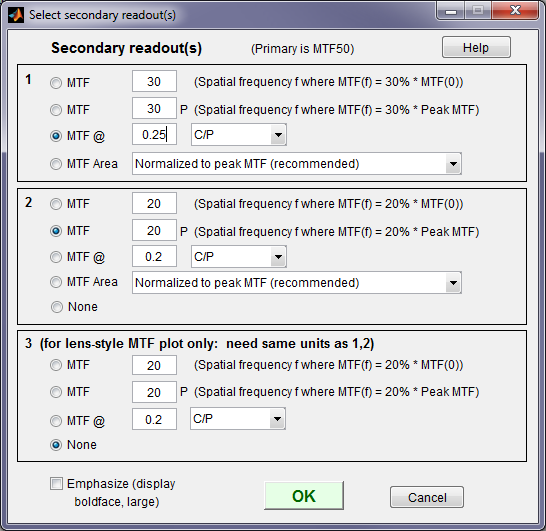
Secondary readouts are displayed in several MTF plots and in CSV and JSON output of sharpness modules. They are also used for pass/fail criteria.
The Secondary readout window (shown on the right) controls the secondary readout display in MTF plots. The primary readout is MTF50 (the half-contrast spatial frequency). Three secondary readouts are available with several options. The first defaults to MTF30 (the spatial frequency where MTF is 30%). The third is used only for SFRplus Lens-style MTF plots.
- The upper radio button (MTF) for each readout selects MTFnn, the spatial frequency where MTF is nn% of its low frequency value.
nn is rdpct, rdpct2, or rdpct3 in the ini file. - The second radio button selects MTFnnP, the spatial frequency where MTF is nn% of its peak value: useful with strongly oversharpened edges.
- The third radio button (MTF @ ) selects MTF @ f units, where f is a spatial frequency in units of Cycles/pixel, LP/mm, or LP/in. If you select this button, the pixel spacing should be specified in the Cycles per... line in the Plot section of the input dialog box, shown above. A reminder message is displayed if the pixel spacing has been omitted.
- The fourth radio button (MTF Area) selects the area under the MTF curve (below the Nyquist frequency). When it is normalized to the peak MTF it tracks MTF50 for low to moderate sharpening, but, unlike MTF50, it remains constant for oversharpened images. Described in Slanted-Edge MTF measurement consistency.
- In INI files,
- rdtype, rdtype2, and rdtype3 are 'MTF', 'MTF__P', 'MTF Area', or MTF @': the type of display, indicated by the radio buttons.
- rdnum, rdnum2, and rdnum3 are frequencies f for MTF @ f plot units (e.g., MTF@0.2 C/P)
- rdpct, rdpct2, and rdpct3 are nn (%) for their respective MTFnn or MTFnnP readouts.
- rdunit, rdunit2, and rdunit3 are the indices for the plot units: 1 for Cycles/Pixel; 2 for Cycles/mm; 3 for Cycles/in.