導入
Imatest IT/.NET 取得ライブラリは、開発者がサポートされているデバイスから画像を直接取得できるようにする .NET ダイナミックリンクライブラリ (DLL) です。取得ライブラリによって返された画像は、Imatest の強力な画像品質分析ルーチンによる分析のために、 Imatest IT/.NETライブラリに渡すことができます。Imatest IT/.NET 取得ライブラリは、 Imatest Masterと同じデバイスとインターフェイスをサポートしています。
| 対応デバイス: |
|---|
| エピファンのフレームグラバー |
| STマイクロエレクトロニクス |
| オムニビジョン( 説明書) |
| グラフィンイージーラボ |
| 東芝 |
| ON Semi DevWare ( 説明書) |
| …そしてその他多数。 |
Imatest IT/.NET 取得ライブラリを参照する
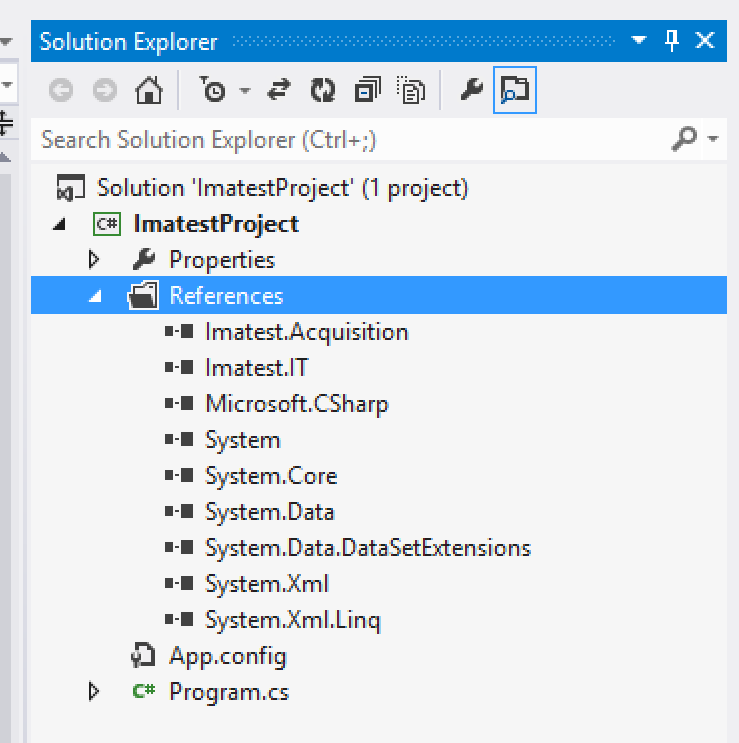
Imatest.IT および Imatest.Acquisition DLL への参照を追加する
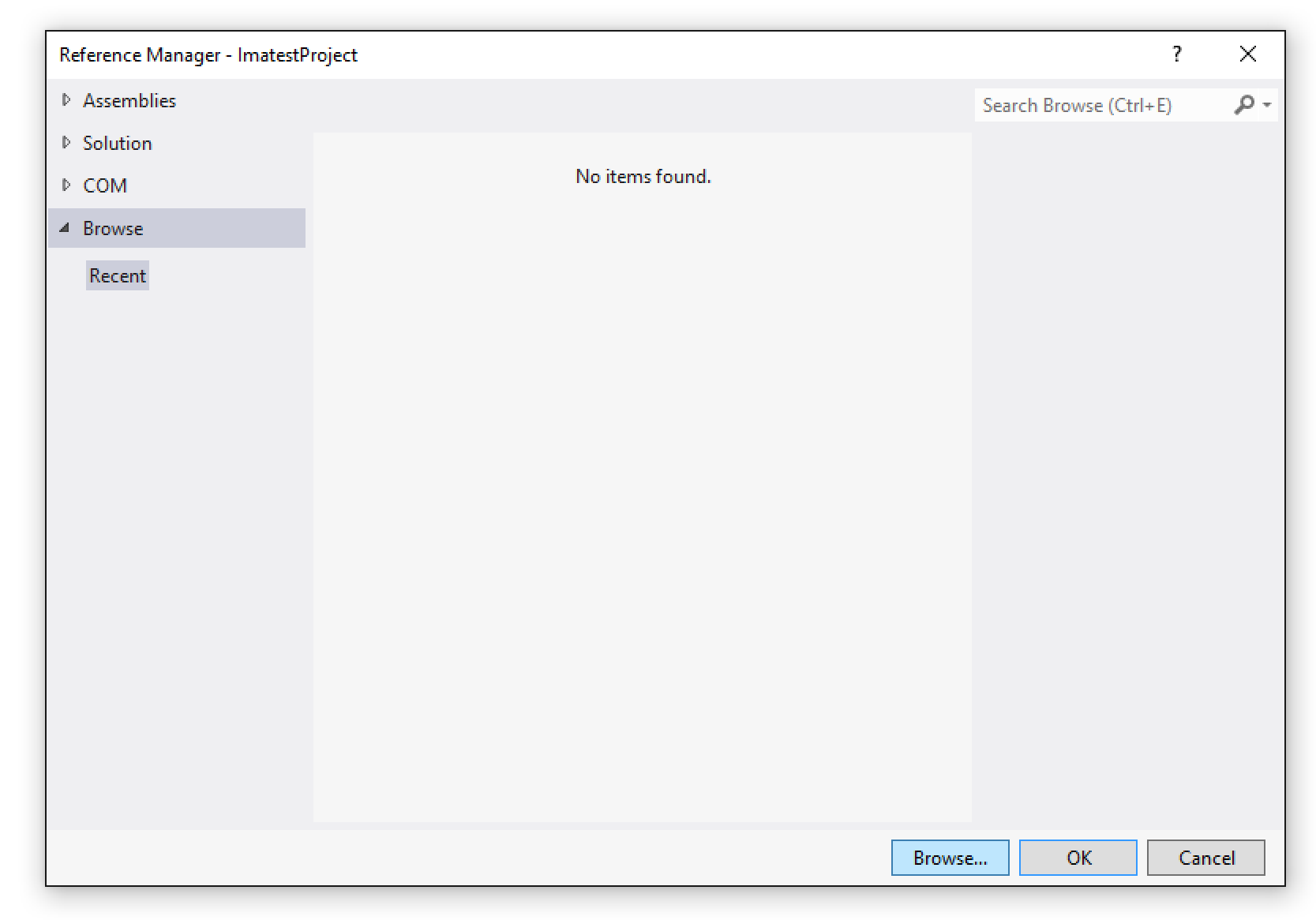
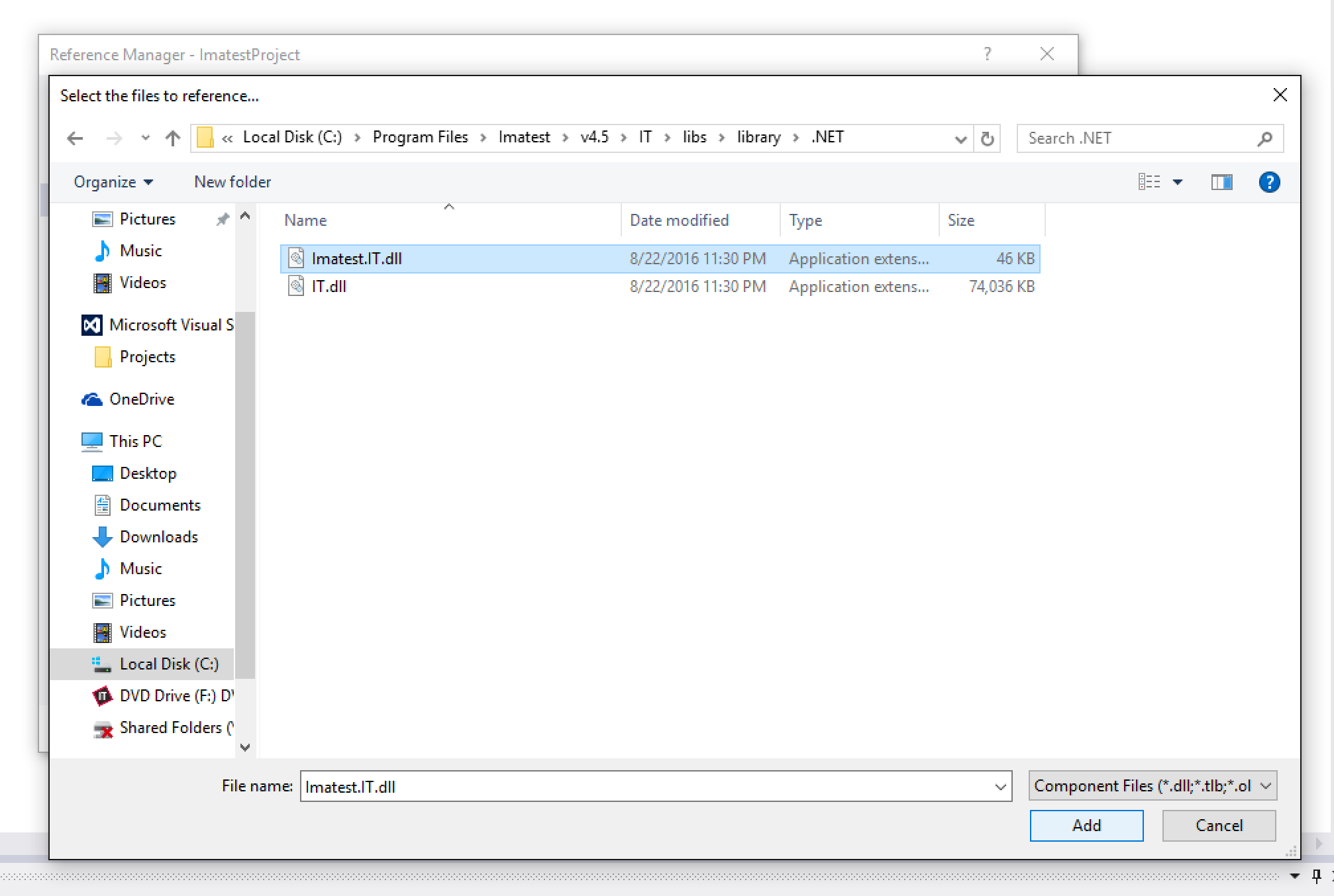
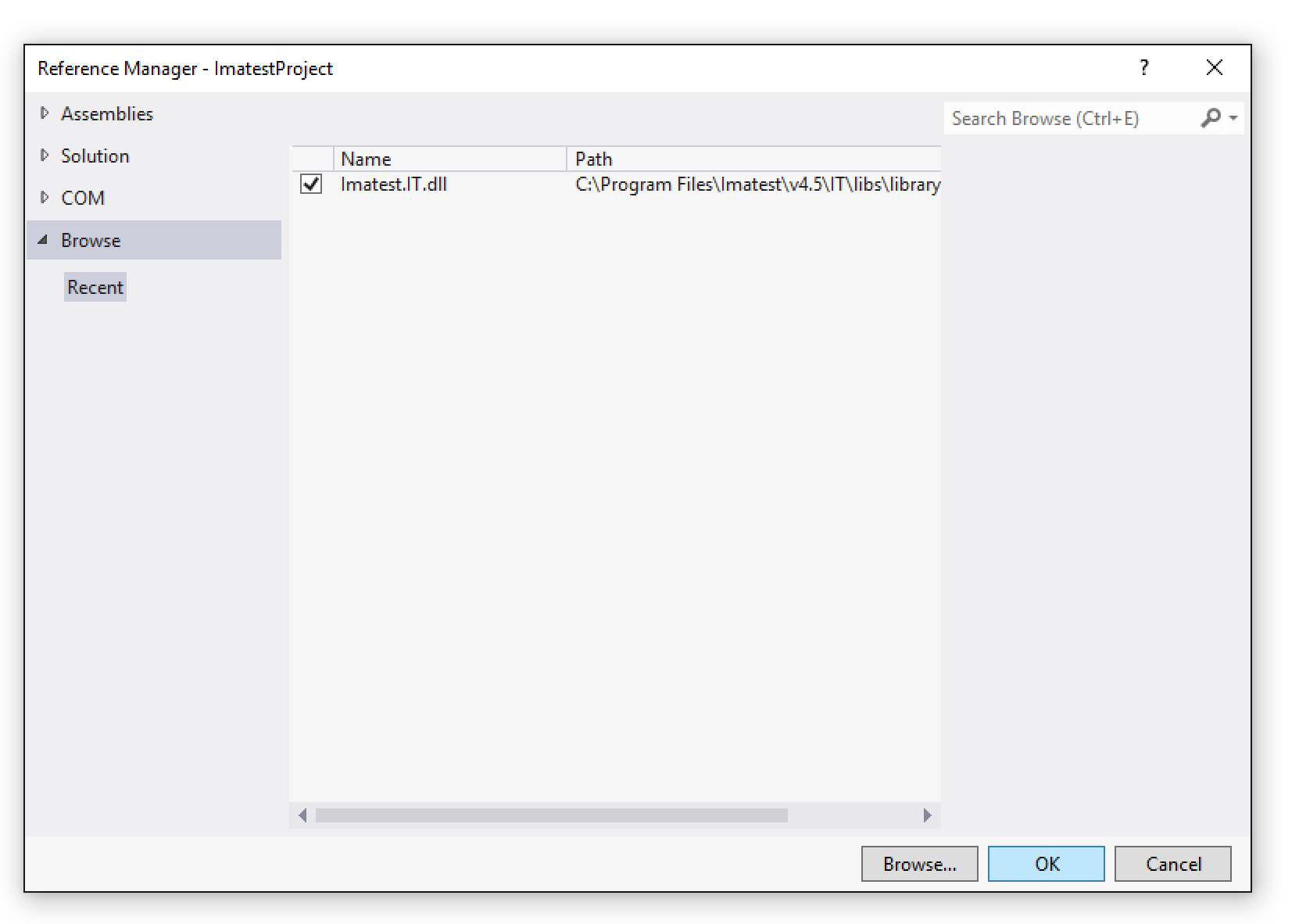
Imatest IT/.NET 取得ライブラリを使用するには、まず .NET プロジェクトにImatest.IT.dllへの参照を追加します。プロジェクトのソリューション エクスプローラーで、 [参照]フォルダーを右クリックし、 [参照の追加...]を選択します。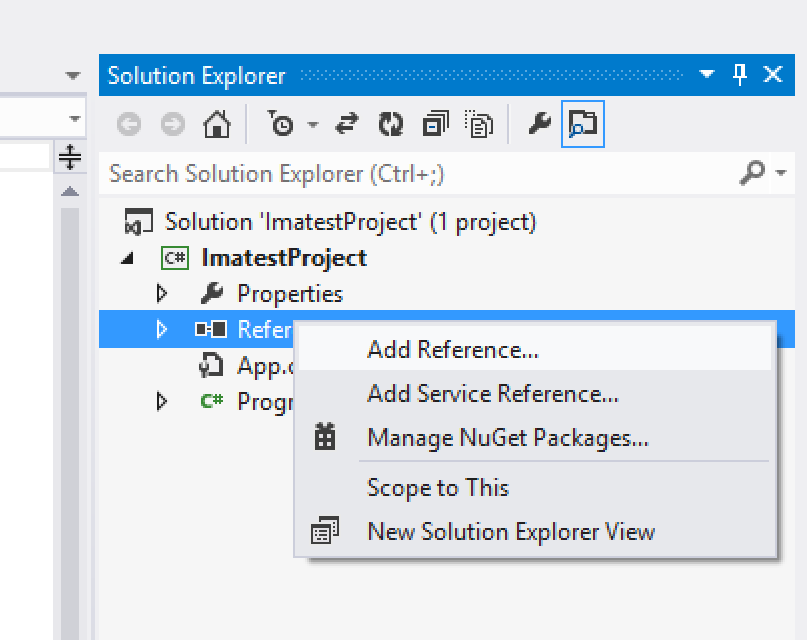
Imatest IT/.NET のアクティベーション
Imatest IT/.NETを使用する前に、試用版を使用している場合でも、インストールをアクティベートする必要があります。アクティベートするには、 C:\Program Files\Imatest\v2021\IT\bin\licensemanager.exeにあるImatest IT License Manager を実行し、 こちらの指示に従ってください。
Using the Imatest IT/.NET Acquisition Library
The AcquisitionLibrary class
All of the functionality of the Imatest IT/.NET Acquisition Library is contained within the AcquisitionLibrary class. To use the library, you must first create an instance of the AcquisitionLibrary class. Although not required, we recommend wrapping the instance inside of a using() block, especially if you are using a floating license. The AcquisitionLibrary class implements IDisposable, and at the end of the using() block, the Dispose() method is called. This will release the current active seat back to the licensing server, allowing others to use it while the AcquisitionLibrary is not in use. If you choose not to use the using() block, then the Dispose() method will be called at the whim of the .NET garbage collector.
using (Library lib = new Library())
{

    /// Use lib to acquire images...
    ...

} /// Here, Dispose() will be called
Constant and Dynamic Device Objects
The Imatest IT/.NET Acquisition Library acquires images using objects of type Device. There are two types of Device objects, "constant" and "dynamic".
Constant Devices
Constant devices already exist as static objects within the Device class, and represent specific imaging devices or interfaces:Imatest.Acquisition.Device.Epiphan // Epiphan frame grabbers
Imatest.Acquisition.Device.OmnivisionOVTA // Omnivision OVTA devices
Imatest.Acquisition.Device.ToshibaImaTuning // Toshiba ImaTuning devices
Imatest.Acquisition.Device.STMConduit // STM Conduit devices
Imatest.Acquisition.Device.GraphinEasyLab // Graphin EasyLab devices
Imatest.Acquisition.Device.ONSemiDevWare // ON Semi DevWare devices
Imatest.Acquisition.Device.AndroidCameraInterface // Android Camera InterfaceEach of the constant devices has its own matching specific AcquireImageFrom*() method and ImatestAcquireOptions class (see the Examples below).
Dynamic Devices and Library.ListDevices()
All other supported devices are discovered at runtime using the AcquisitionLibrary.ListDevices() method (these are "dynamic" devices). The ListDevices() method returns a List<Device> collection of all of devices currently connected to the computer. Any of these Device objects can then be passed into the AcquisitionLibrary.AcquireFromToolboxDevice() method (see the Examples below).
The below code snippet fetches all of the available dynamic devices and prints their names to the console, along with each of their default and supported image formats:
var otherDevices = lib.ListDevices();

foreach(Imatest.Acquisition.Device device in otherDevices)
{
    Console.Out.WriteLine(device.DeviceName);
    Console.Out.WriteLine(string.Format("Default Format: {0}", device.DefaultFormat));
    Console.Out.WriteLine("Supported Formats:");

    foreach(string format in device.SupportedFormats)
    {
        Console.Out.WriteLine(string.Format("    {0}", format));
    }
}
When acquiring from a dynamic device, you can supply any of the supported formats as the VideoFormat property of the ImatestAcquireToolboxDeviceOptions object, or use the Device.DefaultFormat property (see the Examples below).
デバイスの設定
一部のデバイスでは、Imatest Master Device Managerを使用した追加の設定が必要になる場合があります(詳細はこちらをご覧ください)。デバイスを設定し、その設定を JSON ファイル( ImageAcqToolboxSettings.jsonなど)に保存している場合は、このファイルを、使用している INI ファイルと同じディレクトリに配置する必要があります。
画像の取得
イメージは、 LibraryクラスのAcquireFrom*()メソッドを使用してロードされます。定数デバイスにはそれぞれ固有のメソッド ( AcquireFromEpiphan() 、 AcquireFromOmnivisionOVTA()など) がありますが、動的デバイスは単一の汎用メソッド ( AcquireFromToolboxDevice() ) を共有します。各AcquireFrom*()メソッドは、そのデバイス固有のImatestAcquireOptionsオブジェクト ( ImatestAcquireEpiphanOptions 、 ImatestAcquireOmnivisionOVTAOptions 、 ImatestAcquireToolboxDeviceOptionsなど) を受け取ります。各オプション オブジェクトには、少なくともFilename プロパティとExtensionプロパティ、およびその他のデバイス固有のオプションが設定されている必要があります。さまざまなImatestAcquireOptionsオブジェクトを設定する例を以下に示します。
AcquireFrom*()メソッドを呼び出すと、すべてImatestAcquireResultオブジェクトが返されます。ImatestAcquireResult クラスには、取得中にエラーがなかった場合は true、それ以外の場合は false となるブール型のSuccessプロパティがあります。ImatestAcquireResult.Image プロパティはImatestImageオブジェクトであり、 Imatest IT/.NET画像解析モジュールのどのメソッドにも直接渡すことができます。Imatest IT/.NET解析メソッドの使用方法の詳細については、こちらを参照してください。
Examples
Acquiring from a Dynamic Device
This example demonstrates loading an image from a dynamic device object and passing it to the Imatest IT/.NET Stepchart module for testing, then printing the results to the console.
    using (Library lib = new Library())
    {
        DirectoryInfo currentDirectory = new DirectoryInfo(Directory.GetCurrentDirectory());

        string rootDir = currentDirectory.Parent.Parent.Parent.FullName;

        var otherDevices = lib.ListDevices();

        Device device = otherDevices[0];

        ImatestAcquireToolboxDeviceOptions toolboxDeviceOptions = new ImatestAcquireToolboxDeviceOptions();

        toolboxDeviceOptions.Extension = "bmp";
        toolboxDeviceOptions.Filename = "test_image.bmp";
        toolboxDeviceOptions.VideoFormat = device.DefaultFormat;

        ImatestAcquireResult acqResult = lib.AcquireFromToolboxDevice(device, toolboxDeviceOptions);

        if (acqResult.Success)
        {
            ImatestImage img = acqResult.Image;

            string jsonResult = lib.Stepchart.JSON(rootDir, img);

            Console.Out.Write(jsonResult);
        }
        else
        {
            throw new Exception("Could not acquire image from device.");
        }
    }
Acquiring using an Epiphan Device
This example demonstrates loading an image from an Epiphan device and passing it to the Imatest IT/.NET Colorcheck module for testing, then printing the results to the console.
    using (Library lib = new Library())
    {
        DirectoryInfo currentDirectory = new DirectoryInfo(Directory.GetCurrentDirectory());

        string rootDir = currentDirectory.Parent.Parent.Parent.FullName;

        ImatestAcquireEpiphanOptions epiphanOptions = new ImatestAcquireEpiphanOptions();

        epiphanOptions.EpiphanChannel = 0;
        epiphanOptions.Extension = "bmp";
        epiphanOptions.Filename = "test_image.bmp";

        ImatestAcquireResult acqResult = lib.AcquireFromEpiphan(epiphanOptions);

        if (acqResult.Success)
        {
            ImatestImage img = acqResult.Image;

            string jsonResult = lib.Colorcheck.JSON(rootDir, img);

            Console.Out.Write(jsonResult);
        }
        else
        {
            throw new Exception("Could not acquire image from device.");
        }
    }
Acquiring from an Omnivision OVTA Device
This example demonstrates loading an image from an Omnivision OVTA device and passing it to the Imatest IT/.NET SFRplus module for testing, then printing the results to the console.
    using (Library lib = new Library())
    {
        DirectoryInfo currentDirectory = new DirectoryInfo(Directory.GetCurrentDirectory());

        string rootDir = currentDirectory.Parent.Parent.Parent.FullName;

        ImatestAcquireOmnivisionOVTAOptions omnivisionOptions = new ImatestAcquireOmnivisionOVTAOptions();

        omnivisionOptions.Extension = "bmp";
        omnivisionOptions.Filename = "test_image.bmp";
        omnivisionOptions.IniFilePath = Path.Combine(rootDir, "imatest-v2.ini");

        ImatestAcquireResult acqResult = lib.AcquireFromOmnivisionOVTA(omnivisionOptions);

        if (acqResult.Success)
        {
            ImatestImage img = acqResult.Image;

            string jsonResult = lib.SFRplus.JSON(rootDir, img);

            Console.Out.Write(jsonResult);
        }
        else
        {
            throw new Exception("Could not acquire image from device.");
        }
    }
Acquiring from a Toshiba ImaTuning Device
This example demonstrates loading an image from a Toshiba ImaTuning device and passing it to the Imatest IT/.NET Blemish module for testing, then printing the results to the console.
    using (Library lib = new Library())
    {
        DirectoryInfo currentDirectory = new DirectoryInfo(Directory.GetCurrentDirectory());

        string rootDir = currentDirectory.Parent.Parent.Parent.FullName;

        ImatestAcquireToshibaImaTuningOptions toshibaOptions = new ImatestAcquireToshibaImaTuningOptions();

        toshibaOptions.Extension = "bmp";
        toshibaOptions.Filename = "test_image.bmp";

        ImatestAcquireResult acqResult = lib.AcquireFromToshibaImaTuning(toshibaOptions);

        if (acqResult.Success)
        {
            ImatestImage img = acqResult.Image;

            string jsonResult = lib.Blemish.JSON(rootDir, img);

            Console.Out.Write(jsonResult);
        }
        else
        {
            throw new Exception("Could not acquire image from device.");
        }
    }
Acquiring from an STM Conduit Device
This example demonstrates loading an image from an STM Conduit device and passing it to the Imatest IT/.NET Wedge module for testing, then printing the results to the console.
    using (Library lib = new Library())
    {
        DirectoryInfo currentDirectory = new DirectoryInfo(Directory.GetCurrentDirectory());

        string rootDir = currentDirectory.Parent.Parent.Parent.FullName;

        ImatestAcquireSTMConduitOptions stmConduitOptions = new ImatestAcquireSTMConduitOptions();

        stmConduitOptions.Extension = "bmp";
        stmConduitOptions.Filename = "test_image.bmp";

        ImatestAcquireResult acqResult = lib.AcquireFromSTMConduit(stmConduitOptions);

        if (acqResult.Success)
        {
            ImatestImage img = acqResult.Image;

            string jsonResult = lib.Wedge.JSON(rootDir, img);

            Console.Out.Write(jsonResult);
        }
        else
        {
            throw new Exception("Could not acquire image from device.");
        }
    }
Acquiring from a Graphin EasyLab Device
This example demonstrates loading an image from a Graphin EasyLab device and passing it to the Imatest IT/.NET SFRreg module for testing, then printing the results to the console.
    using (Library lib = new Library())
    {
        DirectoryInfo currentDirectory = new DirectoryInfo(Directory.GetCurrentDirectory());

        string rootDir = currentDirectory.Parent.Parent.Parent.FullName;

        ImatestAcquireGraphinEasyLabOptions graphinEasyLabOptions = new ImatestAcquireGraphinEasyLabOptions();

        graphinEasyLabOptions.Extension = "bmp";
        graphinEasyLabOptions.Filename = "test_image.bmp";

        ImatestAcquireResult acqResult = lib.AcquireFromGraphinEasyLab(graphinEasyLabOptions);

        if (acqResult.Success)
        {
            ImatestImage img = acqResult.Image;

            string jsonResult = lib.SFRreg.JSON(rootDir, img);

            Console.Out.Write(jsonResult);
        }
        else
        {
            throw new Exception("Could not acquire image from device.");
        }
    }
Acquiring from an ON Semi DevWare Device
This example demonstrates loading an image from an ON Semi DevWare device and passing it to the Imatest IT/.NET eSFRISO module for testing, then printing the results to the console.
    using (Library lib = new Library())
    {
        DirectoryInfo currentDirectory = new DirectoryInfo(Directory.GetCurrentDirectory());

        string rootDir = currentDirectory.Parent.Parent.Parent.FullName;

        ImatestAcquireONSemiDevWareOptions onSemiDevWareOptions = new ImatestAcquireONSemiDevWareOptions();

        onSemiDevWareOptions.Extension = "bmp";
        onSemiDevWareOptions.Filename = "test_image.bmp";

        ImatestAcquireResult acqResult = lib.AcquireFromONSemiDevWare(onSemiDevWareOptions);

        if (acqResult.Success)
        {
            ImatestImage img = acqResult.Image;

            string jsonResult = lib.eSFRISO.JSON(rootDir, img);

            Console.Out.Write(jsonResult);
        }
        else
        {
            throw new Exception("Could not acquire image from device.");
        }
    }
Acquiring from an Android Camera Interface Device
This example demonstrates loading an image from an Android Camera Interface device and passing it to the Imatest IT/.NET Random module for testing, then printing the results to the console.
    using (Library lib = new Library())
    {
        DirectoryInfo currentDirectory = new DirectoryInfo(Directory.GetCurrentDirectory());

        string rootDir = currentDirectory.Parent.Parent.Parent.FullName;

        ImatestAcquireAndroidCameraInterfaceOptions androidOptions = new ImatestAcquireAndroidCameraInterfaceOptions();

        androidOptions.Extension = "bmp";
        androidOptions.Filename = "test_image.bmp";

        ImatestAcquireResult acqResult = lib.AcquireFromAndroidCameraInterface(androidOptions);

        if (acqResult.Success)
        {
            ImatestImage img = acqResult.Image;

            string jsonResult = lib.Random.JSON(rootDir, img);

            Console.Out.Write(jsonResult);
        }
        else
        {
            throw new Exception("Could not acquire image from device.");
        }
    }
Acquiring from a File
This example demonstrates loading an image from a file and passing it to the Imatest IT/.NET Stepchart module for testing, then printing the results to the console.
    using (Library lib = new Library())
    {
        DirectoryInfo currentDirectory = new DirectoryInfo(Directory.GetCurrentDirectory());

        string rootDir = currentDirectory.Parent.Parent.Parent.FullName;

        ImatestAcquireFromFileOptions fromFileOptions = new ImatestAcquireFromFileOptions();

        fromFileOptions.Extension = "bmp";
        fromFileOptions.Filename = "test_image.bmp";
        fromFileOptions.ImageFilePath = @"C:\Program Files\Imatest\v4.5\IT\samples\images\stepchart_example.jpg";
        fromFileOptions.IniFilePath = Path.Combine(rootDir, "imatest-v2.ini");

        ImatestAcquireResult acqResult = lib.AcquireFromFile(fromFileOptions);

        if (acqResult.Success)
        {
            ImatestImage img = acqResult.Image;

            string jsonResult = lib.Stepchart.JSON(rootDir, img);

            Console.Out.Write(jsonResult);
        }
        else
        {
            throw new Exception("Could not acquire image from device.");
        }
    }
注記
- デバイスは、それぞれの制御ソフトウェアによって適切に初期化されてから、 AcquireFrom*()メソッドを呼び出す必要があります。
- デバイスがImatest IS Device Managerによって保存された設定を必要とする場合、対応するデバイス設定JSONファイルをImatest INIファイルに含める必要があります。