소개
Imatest IT/.NET 이미지 획득 라이브러리 는 개발자가 지원되는 장치에서 직접 이미지를 획득할 수 있도록 하는 .NET 동적 링크 라이브러리(DLL)입니다. 획득 라이브러리 에서 반환된 이미지는 Imatest의 강력한 이미지 품질 분석 루틴을 통해 분석하기 위해 Imatest IT/.NET 라이브러리로 전달될 수 있습니다. Imatest IT/.NET 이미지 획득 라이브러리는 Imatest 마스터 와 동일한 장치 및 인터페이스를 지원합니다.
| 지원되는 기기: |
|---|
| 에피판 프레임 그래버 |
| ST마이크로일렉트로닉스 |
| 옴니비전 ( 지침 ) |
| 그래프인 이지랩 |
| 도시바 |
| ON Semi DevWare ( 지침 ) |
| …그리고 다른 많은 사람들 . |
Imatest IT/.NET 구매 라이브러리 참조
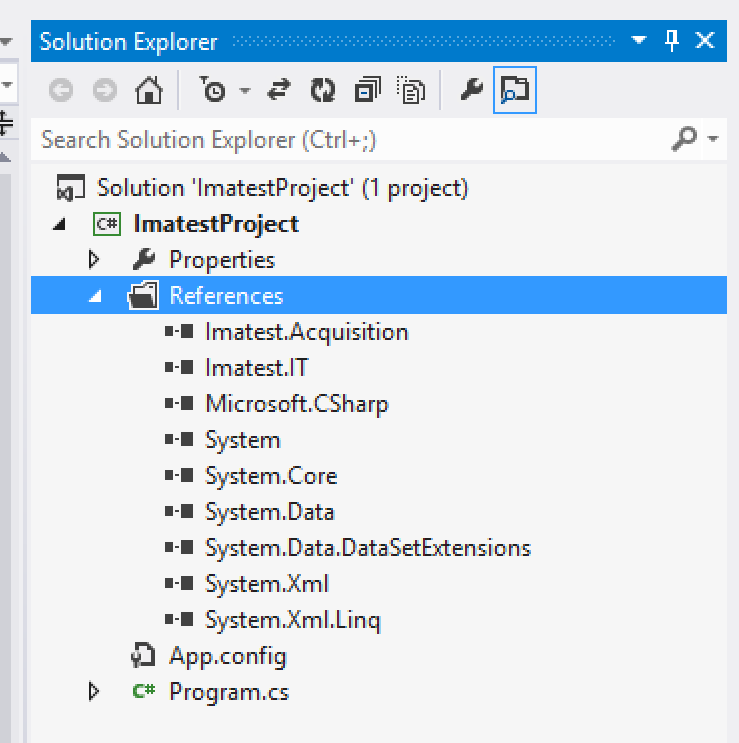
Imatest.IT 및 Imatest.Acquisition DLL에 참조 추가
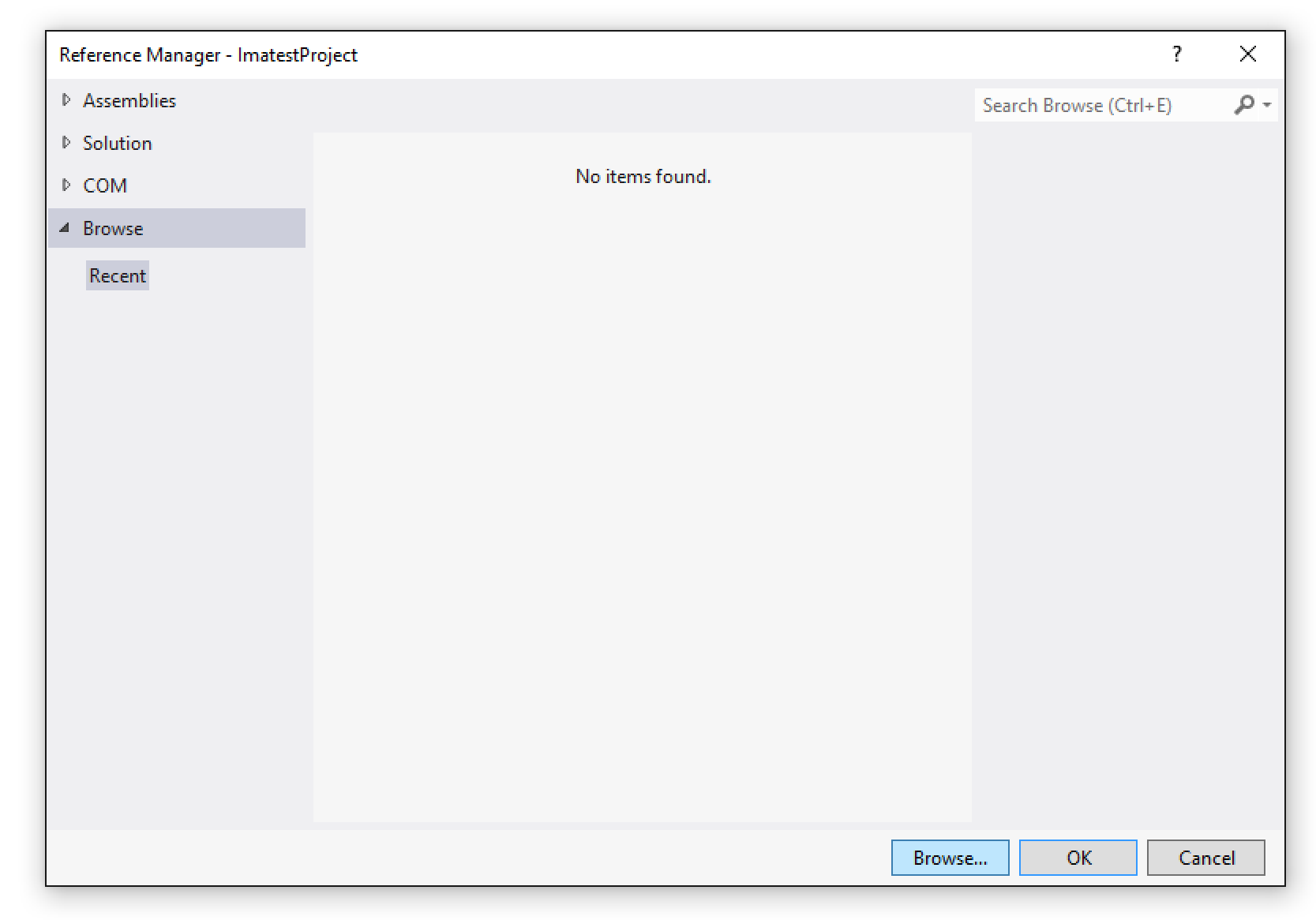
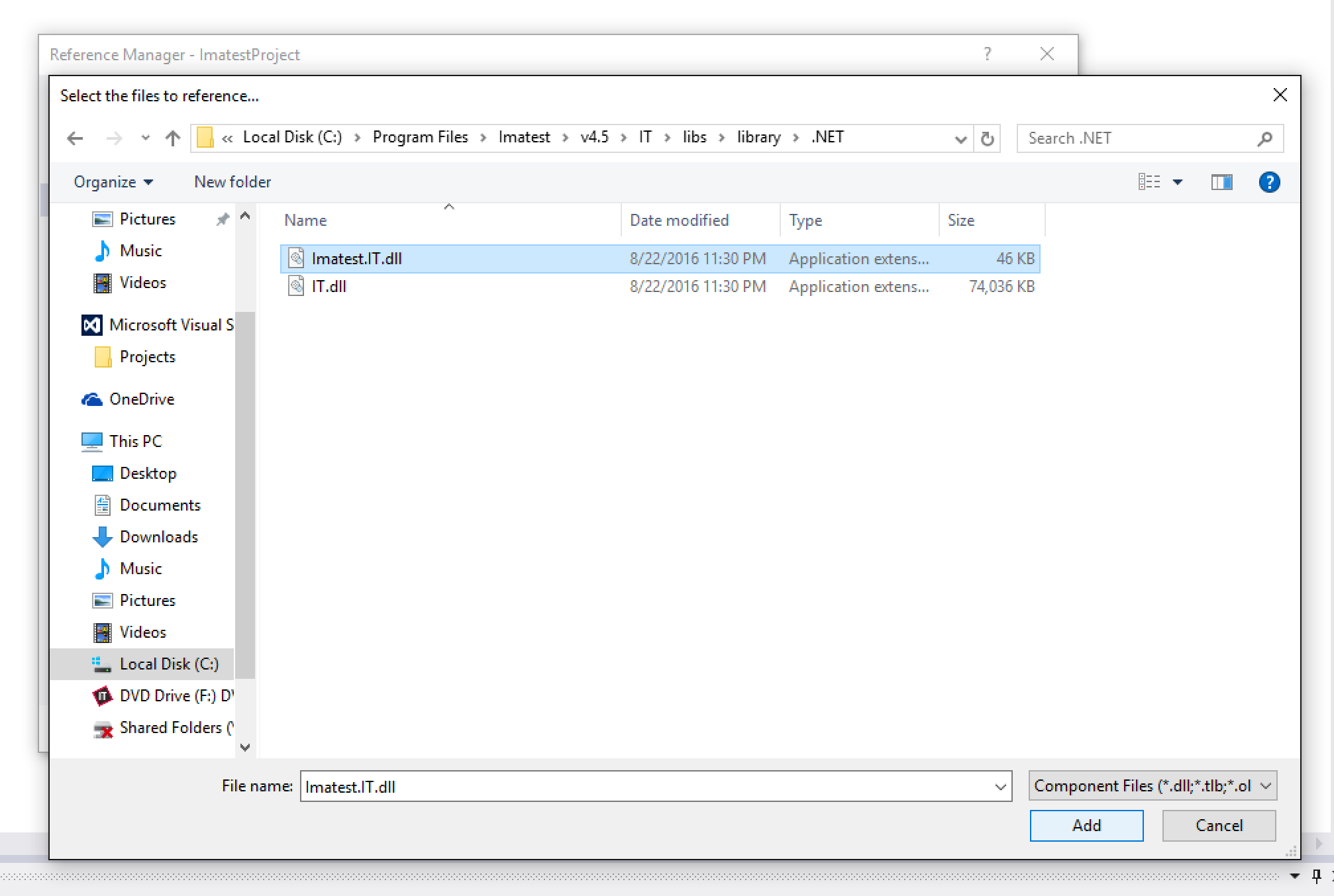
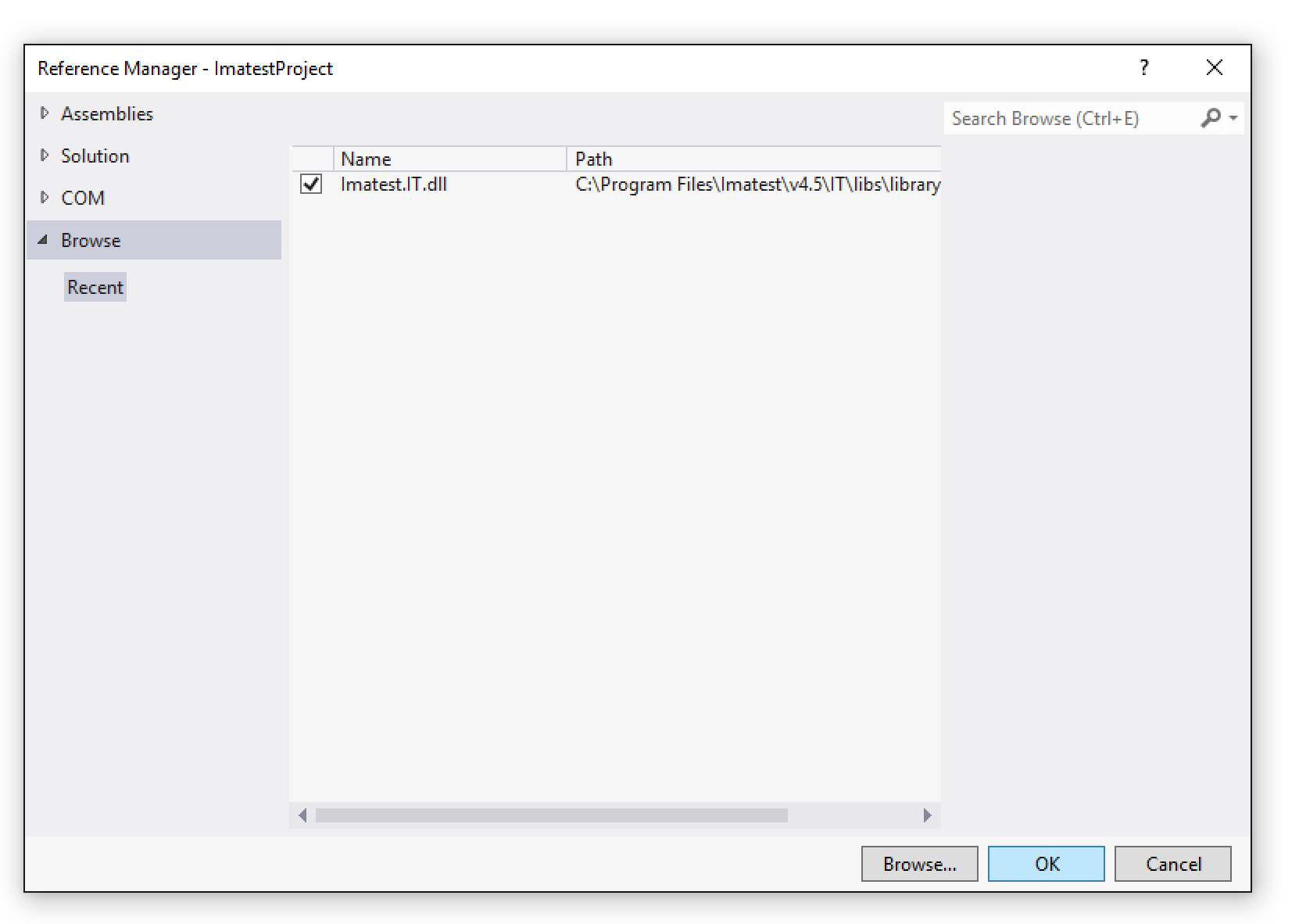
Imatest IT/.NET 데이터 수집 라이브러리를 사용하려면 먼저 .NET 프로젝트에 Imatest.IT.dll 참조를 추가해야 합니다. 프로젝트의 솔루션 탐색기 에서 참조 폴더를 마우스 오른쪽 버튼으로 클릭하고 "참조 추가..."를 선택하십시오.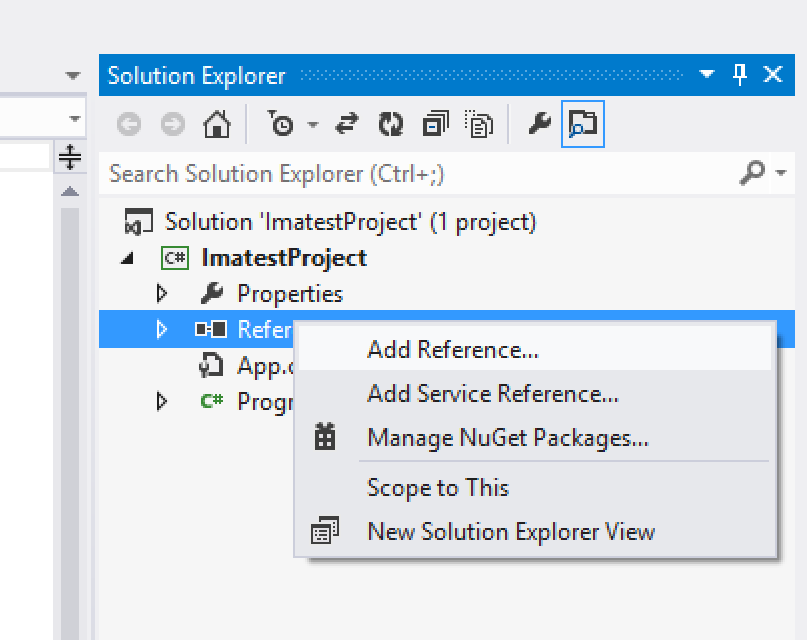
Imatest IT/.NET 활성화
Imatest IT/.NET을 사용하기 전에 평가판을 사용 중인 경우에도 설치를 활성화해야 합니다. 활성화하려면 C:\Program Files\Imatest\v2021\IT\bin\licensemanager.exe 에 있는 Imatest IT 라이선스 관리자를 실행하고 여기의 지침을 따르십시오.
Using the Imatest IT/.NET Acquisition Library
The AcquisitionLibrary class
All of the functionality of the Imatest IT/.NET Acquisition Library is contained within the AcquisitionLibrary class. To use the library, you must first create an instance of the AcquisitionLibrary class. Although not required, we recommend wrapping the instance inside of a using() block, especially if you are using a floating license. The AcquisitionLibrary class implements IDisposable, and at the end of the using() block, the Dispose() method is called. This will release the current active seat back to the licensing server, allowing others to use it while the AcquisitionLibrary is not in use. If you choose not to use the using() block, then the Dispose() method will be called at the whim of the .NET garbage collector.
using (Library lib = new Library())
{

    /// Use lib to acquire images...
    ...

} /// Here, Dispose() will be called
Constant and Dynamic Device Objects
The Imatest IT/.NET Acquisition Library acquires images using objects of type Device. There are two types of Device objects, "constant" and "dynamic".
Constant Devices
Constant devices already exist as static objects within the Device class, and represent specific imaging devices or interfaces:Imatest.Acquisition.Device.Epiphan // Epiphan frame grabbers
Imatest.Acquisition.Device.OmnivisionOVTA // Omnivision OVTA devices
Imatest.Acquisition.Device.ToshibaImaTuning // Toshiba ImaTuning devices
Imatest.Acquisition.Device.STMConduit // STM Conduit devices
Imatest.Acquisition.Device.GraphinEasyLab // Graphin EasyLab devices
Imatest.Acquisition.Device.ONSemiDevWare // ON Semi DevWare devices
Imatest.Acquisition.Device.AndroidCameraInterface // Android Camera InterfaceEach of the constant devices has its own matching specific AcquireImageFrom*() method and ImatestAcquireOptions class (see the Examples below).
Dynamic Devices and Library.ListDevices()
All other supported devices are discovered at runtime using the AcquisitionLibrary.ListDevices() method (these are "dynamic" devices). The ListDevices() method returns a List<Device> collection of all of devices currently connected to the computer. Any of these Device objects can then be passed into the AcquisitionLibrary.AcquireFromToolboxDevice() method (see the Examples below).
The below code snippet fetches all of the available dynamic devices and prints their names to the console, along with each of their default and supported image formats:
var otherDevices = lib.ListDevices();

foreach(Imatest.Acquisition.Device device in otherDevices)
{
    Console.Out.WriteLine(device.DeviceName);
    Console.Out.WriteLine(string.Format("Default Format: {0}", device.DefaultFormat));
    Console.Out.WriteLine("Supported Formats:");

    foreach(string format in device.SupportedFormats)
    {
        Console.Out.WriteLine(string.Format("    {0}", format));
    }
}
When acquiring from a dynamic device, you can supply any of the supported formats as the VideoFormat property of the ImatestAcquireToolboxDeviceOptions object, or use the Device.DefaultFormat property (see the Examples below).
장치 구성
일부 장치는 Imatest 마스터 장치 관리자를 사용하여 추가 구성이 필요할 수 있습니다(자세한 내용은 여기를 참조하십시오). 장치를 구성하고 설정을 JSON 파일(예: ImageAcqToolboxSettings.json )에 저장한 경우, 해당 파일은 사용 중인 INI 파일과 동일한 디렉터리에 있어야 합니다.
이미지 획득
이미지는 Library 클래스의 AcquireFrom*() 메서드를 사용하여 로드됩니다. 고정 장치는 각각 고유한 메서드( AcquireFromEpiphan() , AcquireFromOmnivisionOVTA() 등)를 가지는 반면, 동적 장치는 하나의 공통 메서드( AcquireFromToolboxDevice() )를 공유합니다. 각 AcquireFrom*() 메서드는 해당 장치에 특화된 ImatestAcquireOptions 객체( ImatestAcquireEpiphanOptions , ImatestAcquireOmnivisionOVTAOptions , ImatestAcquireToolboxDeviceOptions 등)를 매개변수로 받습니다. 각 옵션 객체에는 최소한 Filename 및 Extension 속성과 기타 장치별 옵션이 설정되어 있어야 합니다. 다양한 ImatestAcquireOptions 객체를 채우는 예제는 아래에서 확인할 수 있습니다.
AcquireFrom*() 메서드 호출은 모두 ImatestAcquireResult 객체를 반환합니다. ImatestAcquireResult 클래스에는 획득 과정에서 오류가 없었으면 true, 그렇지 않으면 false를 반환하는 부울 값 Success 속성이 있습니다. ImatestAcquireResult.Image 속성은 ImatestImage 객체이며, 이 객체는 Imatest IT/.NET 이미지 분석 모듈의 모든 메서드에 직접 전달할 수 있습니다. Imatest IT/.NET 분석 메서드 사용에 대한 자세한 내용은 여기를 참조하십시오.
Examples
Acquiring from a Dynamic Device
This example demonstrates loading an image from a dynamic device object and passing it to the Imatest IT/.NET Stepchart module for testing, then printing the results to the console.
    using (Library lib = new Library())
    {
        DirectoryInfo currentDirectory = new DirectoryInfo(Directory.GetCurrentDirectory());

        string rootDir = currentDirectory.Parent.Parent.Parent.FullName;

        var otherDevices = lib.ListDevices();

        Device device = otherDevices[0];

        ImatestAcquireToolboxDeviceOptions toolboxDeviceOptions = new ImatestAcquireToolboxDeviceOptions();

        toolboxDeviceOptions.Extension = "bmp";
        toolboxDeviceOptions.Filename = "test_image.bmp";
        toolboxDeviceOptions.VideoFormat = device.DefaultFormat;

        ImatestAcquireResult acqResult = lib.AcquireFromToolboxDevice(device, toolboxDeviceOptions);

        if (acqResult.Success)
        {
            ImatestImage img = acqResult.Image;

            string jsonResult = lib.Stepchart.JSON(rootDir, img);

            Console.Out.Write(jsonResult);
        }
        else
        {
            throw new Exception("Could not acquire image from device.");
        }
    }
Acquiring using an Epiphan Device
This example demonstrates loading an image from an Epiphan device and passing it to the Imatest IT/.NET Colorcheck module for testing, then printing the results to the console.
    using (Library lib = new Library())
    {
        DirectoryInfo currentDirectory = new DirectoryInfo(Directory.GetCurrentDirectory());

        string rootDir = currentDirectory.Parent.Parent.Parent.FullName;

        ImatestAcquireEpiphanOptions epiphanOptions = new ImatestAcquireEpiphanOptions();

        epiphanOptions.EpiphanChannel = 0;
        epiphanOptions.Extension = "bmp";
        epiphanOptions.Filename = "test_image.bmp";

        ImatestAcquireResult acqResult = lib.AcquireFromEpiphan(epiphanOptions);

        if (acqResult.Success)
        {
            ImatestImage img = acqResult.Image;

            string jsonResult = lib.Colorcheck.JSON(rootDir, img);

            Console.Out.Write(jsonResult);
        }
        else
        {
            throw new Exception("Could not acquire image from device.");
        }
    }
Acquiring from an Omnivision OVTA Device
This example demonstrates loading an image from an Omnivision OVTA device and passing it to the Imatest IT/.NET SFRplus module for testing, then printing the results to the console.
    using (Library lib = new Library())
    {
        DirectoryInfo currentDirectory = new DirectoryInfo(Directory.GetCurrentDirectory());

        string rootDir = currentDirectory.Parent.Parent.Parent.FullName;

        ImatestAcquireOmnivisionOVTAOptions omnivisionOptions = new ImatestAcquireOmnivisionOVTAOptions();

        omnivisionOptions.Extension = "bmp";
        omnivisionOptions.Filename = "test_image.bmp";
        omnivisionOptions.IniFilePath = Path.Combine(rootDir, "imatest-v2.ini");

        ImatestAcquireResult acqResult = lib.AcquireFromOmnivisionOVTA(omnivisionOptions);

        if (acqResult.Success)
        {
            ImatestImage img = acqResult.Image;

            string jsonResult = lib.SFRplus.JSON(rootDir, img);

            Console.Out.Write(jsonResult);
        }
        else
        {
            throw new Exception("Could not acquire image from device.");
        }
    }
Acquiring from a Toshiba ImaTuning Device
This example demonstrates loading an image from a Toshiba ImaTuning device and passing it to the Imatest IT/.NET Blemish module for testing, then printing the results to the console.
    using (Library lib = new Library())
    {
        DirectoryInfo currentDirectory = new DirectoryInfo(Directory.GetCurrentDirectory());

        string rootDir = currentDirectory.Parent.Parent.Parent.FullName;

        ImatestAcquireToshibaImaTuningOptions toshibaOptions = new ImatestAcquireToshibaImaTuningOptions();

        toshibaOptions.Extension = "bmp";
        toshibaOptions.Filename = "test_image.bmp";

        ImatestAcquireResult acqResult = lib.AcquireFromToshibaImaTuning(toshibaOptions);

        if (acqResult.Success)
        {
            ImatestImage img = acqResult.Image;

            string jsonResult = lib.Blemish.JSON(rootDir, img);

            Console.Out.Write(jsonResult);
        }
        else
        {
            throw new Exception("Could not acquire image from device.");
        }
    }
Acquiring from an STM Conduit Device
This example demonstrates loading an image from an STM Conduit device and passing it to the Imatest IT/.NET Wedge module for testing, then printing the results to the console.
    using (Library lib = new Library())
    {
        DirectoryInfo currentDirectory = new DirectoryInfo(Directory.GetCurrentDirectory());

        string rootDir = currentDirectory.Parent.Parent.Parent.FullName;

        ImatestAcquireSTMConduitOptions stmConduitOptions = new ImatestAcquireSTMConduitOptions();

        stmConduitOptions.Extension = "bmp";
        stmConduitOptions.Filename = "test_image.bmp";

        ImatestAcquireResult acqResult = lib.AcquireFromSTMConduit(stmConduitOptions);

        if (acqResult.Success)
        {
            ImatestImage img = acqResult.Image;

            string jsonResult = lib.Wedge.JSON(rootDir, img);

            Console.Out.Write(jsonResult);
        }
        else
        {
            throw new Exception("Could not acquire image from device.");
        }
    }
Acquiring from a Graphin EasyLab Device
This example demonstrates loading an image from a Graphin EasyLab device and passing it to the Imatest IT/.NET SFRreg module for testing, then printing the results to the console.
    using (Library lib = new Library())
    {
        DirectoryInfo currentDirectory = new DirectoryInfo(Directory.GetCurrentDirectory());

        string rootDir = currentDirectory.Parent.Parent.Parent.FullName;

        ImatestAcquireGraphinEasyLabOptions graphinEasyLabOptions = new ImatestAcquireGraphinEasyLabOptions();

        graphinEasyLabOptions.Extension = "bmp";
        graphinEasyLabOptions.Filename = "test_image.bmp";

        ImatestAcquireResult acqResult = lib.AcquireFromGraphinEasyLab(graphinEasyLabOptions);

        if (acqResult.Success)
        {
            ImatestImage img = acqResult.Image;

            string jsonResult = lib.SFRreg.JSON(rootDir, img);

            Console.Out.Write(jsonResult);
        }
        else
        {
            throw new Exception("Could not acquire image from device.");
        }
    }
Acquiring from an ON Semi DevWare Device
This example demonstrates loading an image from an ON Semi DevWare device and passing it to the Imatest IT/.NET eSFRISO module for testing, then printing the results to the console.
    using (Library lib = new Library())
    {
        DirectoryInfo currentDirectory = new DirectoryInfo(Directory.GetCurrentDirectory());

        string rootDir = currentDirectory.Parent.Parent.Parent.FullName;

        ImatestAcquireONSemiDevWareOptions onSemiDevWareOptions = new ImatestAcquireONSemiDevWareOptions();

        onSemiDevWareOptions.Extension = "bmp";
        onSemiDevWareOptions.Filename = "test_image.bmp";

        ImatestAcquireResult acqResult = lib.AcquireFromONSemiDevWare(onSemiDevWareOptions);

        if (acqResult.Success)
        {
            ImatestImage img = acqResult.Image;

            string jsonResult = lib.eSFRISO.JSON(rootDir, img);

            Console.Out.Write(jsonResult);
        }
        else
        {
            throw new Exception("Could not acquire image from device.");
        }
    }
Acquiring from an Android Camera Interface Device
This example demonstrates loading an image from an Android Camera Interface device and passing it to the Imatest IT/.NET Random module for testing, then printing the results to the console.
    using (Library lib = new Library())
    {
        DirectoryInfo currentDirectory = new DirectoryInfo(Directory.GetCurrentDirectory());

        string rootDir = currentDirectory.Parent.Parent.Parent.FullName;

        ImatestAcquireAndroidCameraInterfaceOptions androidOptions = new ImatestAcquireAndroidCameraInterfaceOptions();

        androidOptions.Extension = "bmp";
        androidOptions.Filename = "test_image.bmp";

        ImatestAcquireResult acqResult = lib.AcquireFromAndroidCameraInterface(androidOptions);

        if (acqResult.Success)
        {
            ImatestImage img = acqResult.Image;

            string jsonResult = lib.Random.JSON(rootDir, img);

            Console.Out.Write(jsonResult);
        }
        else
        {
            throw new Exception("Could not acquire image from device.");
        }
    }
Acquiring from a File
This example demonstrates loading an image from a file and passing it to the Imatest IT/.NET Stepchart module for testing, then printing the results to the console.
    using (Library lib = new Library())
    {
        DirectoryInfo currentDirectory = new DirectoryInfo(Directory.GetCurrentDirectory());

        string rootDir = currentDirectory.Parent.Parent.Parent.FullName;

        ImatestAcquireFromFileOptions fromFileOptions = new ImatestAcquireFromFileOptions();

        fromFileOptions.Extension = "bmp";
        fromFileOptions.Filename = "test_image.bmp";
        fromFileOptions.ImageFilePath = @"C:\Program Files\Imatest\v4.5\IT\samples\images\stepchart_example.jpg";
        fromFileOptions.IniFilePath = Path.Combine(rootDir, "imatest-v2.ini");

        ImatestAcquireResult acqResult = lib.AcquireFromFile(fromFileOptions);

        if (acqResult.Success)
        {
            ImatestImage img = acqResult.Image;

            string jsonResult = lib.Stepchart.JSON(rootDir, img);

            Console.Out.Write(jsonResult);
        }
        else
        {
            throw new Exception("Could not acquire image from device.");
        }
    }
메모
- 장치는 AcquireFrom*() 메서드를 호출하기 전에 각 제어 소프트웨어에 의해 올바르게 초기화되어야 합니다.
- 기기가 Imatest IS Device Manager 에 저장된 설정을 필요로 하는 경우, 해당 기기 설정 JSON 파일을 Imatest INI 파일에 포함시켜야 합니다.