介绍
Imatest IT/.NET 图像采集库是一个 .NET 动态链接库 (DLL),它使开发人员能够直接从受支持的设备采集图像。采集库返回的图像随后可以传递给Imatest IT/.NET库,以便由 Imatest 强大的图像质量分析例程进行分析。Imatest IT/.NET 图像采集库支持与Imatest Master相同的设备和接口:
| 支持的设备: |
|---|
| Epiphan 帧捕获器 |
| 意法半导体 |
| Omnivision (说明) |
| Graphin EasyLab |
| 东芝 |
| ON Semi DevWare (说明) |
| ……以及其他许多方面。 |
参考 Imatest IT/.NET 收购库
添加对 Imatest.IT 和 Imatest.Acquisition DLL 的引用
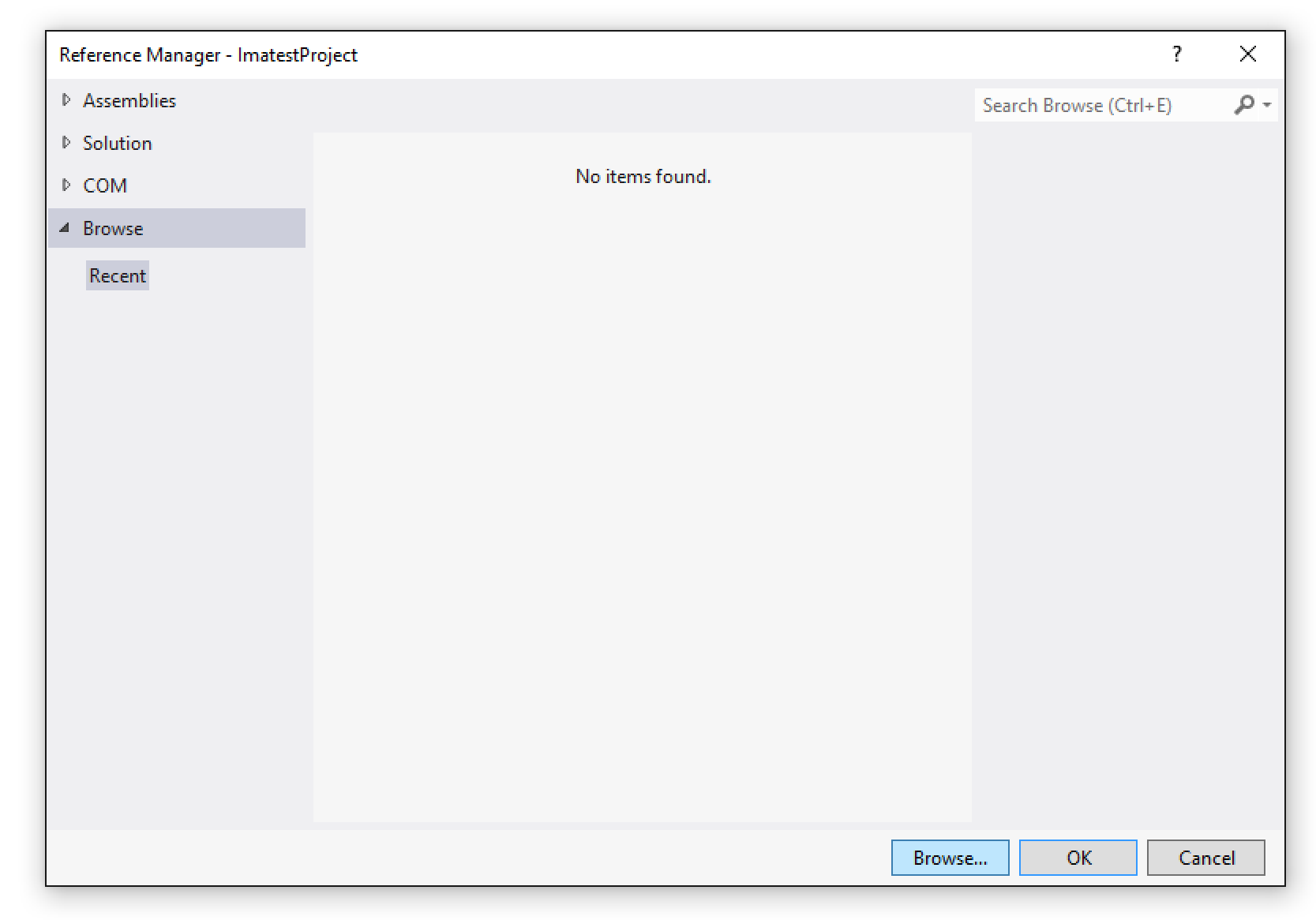
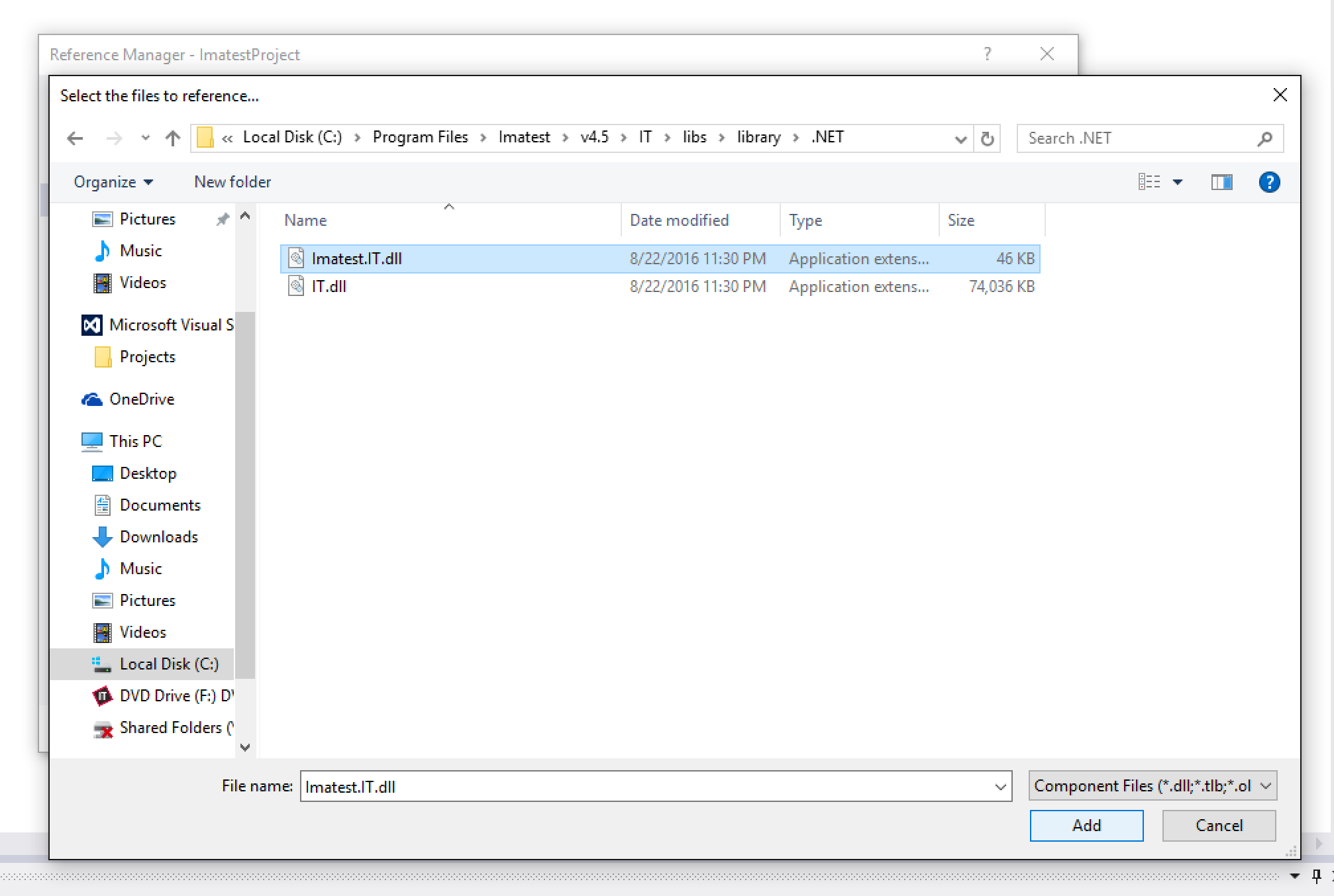
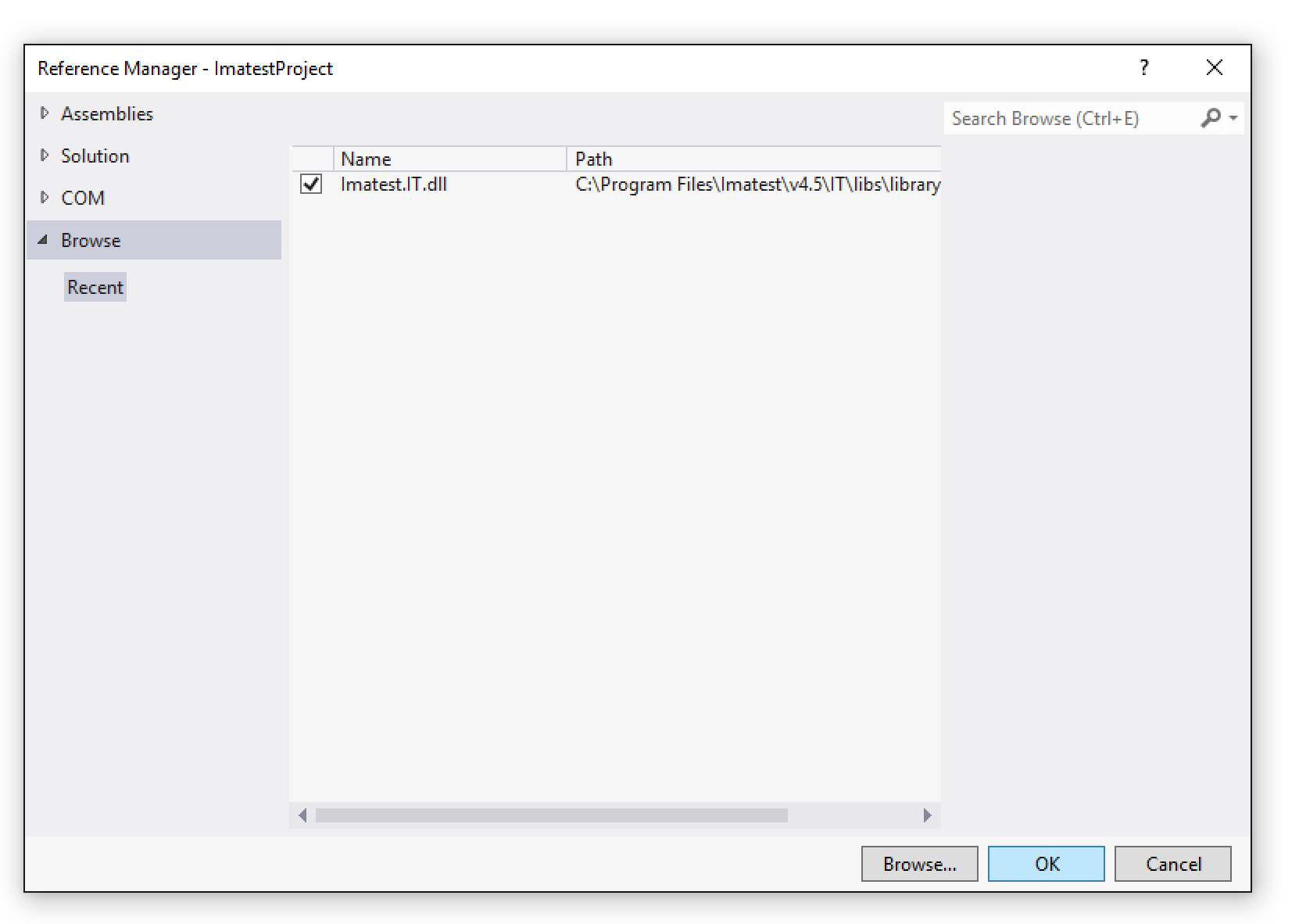
要使用Imatest IT/.NET 采集库,首先需要将Imatest.IT.dll添加到您的 .NET 项目中。在项目的解决方案资源管理器中,右键单击“引用”文件夹,然后选择“添加引用...”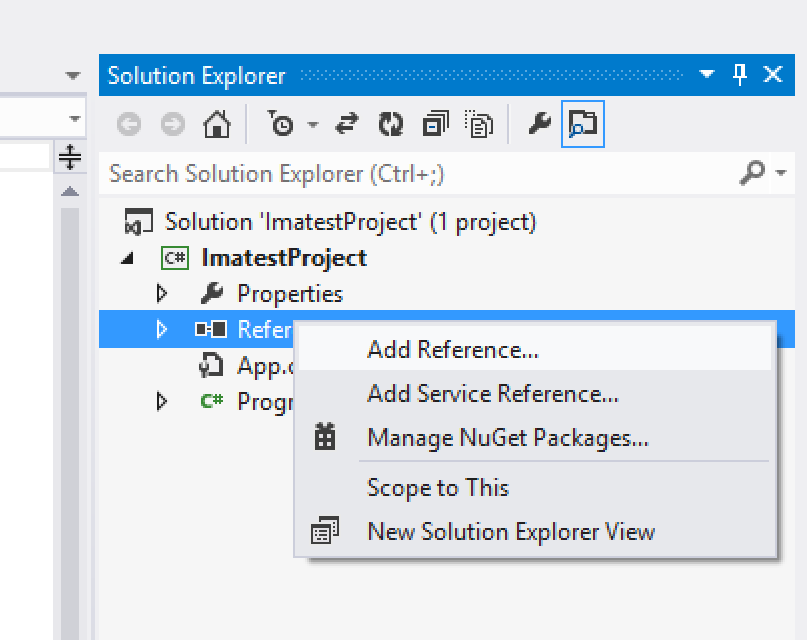
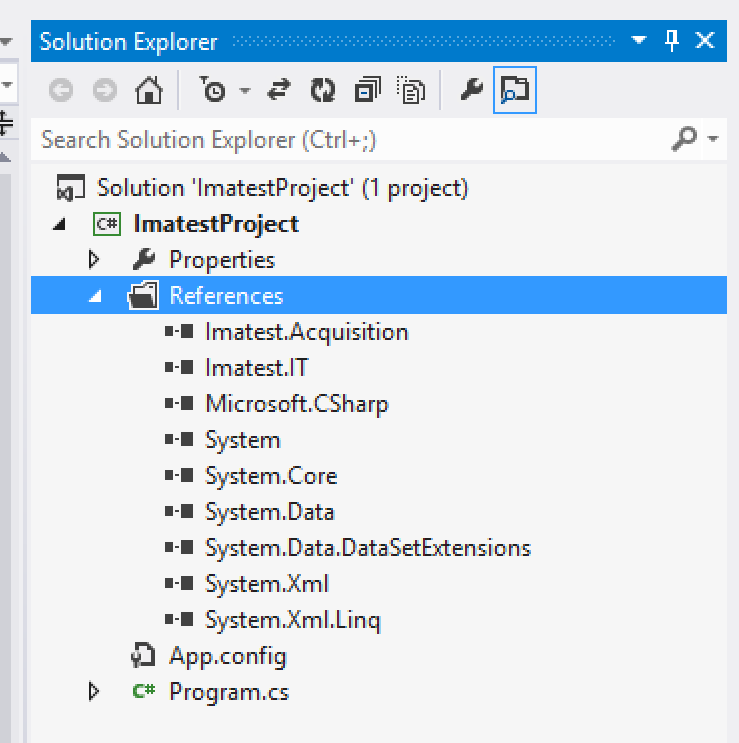
激活 Imatest IT/.NET
使用Imatest IT/.NET之前,即使您使用的是试用版,也需要激活您的安装程序。要激活,请运行位于C:\Program Files\Imatest\v2021\IT\bin\licensemanager.exe 的Imatest IT 许可证管理器,并按照此处的说明进行操作。
Using the Imatest IT/.NET Acquisition Library
The AcquisitionLibrary class
All of the functionality of the Imatest IT/.NET Acquisition Library is contained within the AcquisitionLibrary class. To use the library, you must first create an instance of the AcquisitionLibrary class. Although not required, we recommend wrapping the instance inside of a using() block, especially if you are using a floating license. The AcquisitionLibrary class implements IDisposable, and at the end of the using() block, the Dispose() method is called. This will release the current active seat back to the licensing server, allowing others to use it while the AcquisitionLibrary is not in use. If you choose not to use the using() block, then the Dispose() method will be called at the whim of the .NET garbage collector.
using (Library lib = new Library())
{

    /// Use lib to acquire images...
    ...

} /// Here, Dispose() will be called
Constant and Dynamic Device Objects
The Imatest IT/.NET Acquisition Library acquires images using objects of type Device. There are two types of Device objects, "constant" and "dynamic".
Constant Devices
Constant devices already exist as static objects within the Device class, and represent specific imaging devices or interfaces:Imatest.Acquisition.Device.Epiphan // Epiphan frame grabbers
Imatest.Acquisition.Device.OmnivisionOVTA // Omnivision OVTA devices
Imatest.Acquisition.Device.ToshibaImaTuning // Toshiba ImaTuning devices
Imatest.Acquisition.Device.STMConduit // STM Conduit devices
Imatest.Acquisition.Device.GraphinEasyLab // Graphin EasyLab devices
Imatest.Acquisition.Device.ONSemiDevWare // ON Semi DevWare devices
Imatest.Acquisition.Device.AndroidCameraInterface // Android Camera InterfaceEach of the constant devices has its own matching specific AcquireImageFrom*() method and ImatestAcquireOptions class (see the Examples below).
Dynamic Devices and Library.ListDevices()
All other supported devices are discovered at runtime using the AcquisitionLibrary.ListDevices() method (these are "dynamic" devices). The ListDevices() method returns a List<Device> collection of all of devices currently connected to the computer. Any of these Device objects can then be passed into the AcquisitionLibrary.AcquireFromToolboxDevice() method (see the Examples below).
The below code snippet fetches all of the available dynamic devices and prints their names to the console, along with each of their default and supported image formats:
var otherDevices = lib.ListDevices();

foreach(Imatest.Acquisition.Device device in otherDevices)
{
    Console.Out.WriteLine(device.DeviceName);
    Console.Out.WriteLine(string.Format("Default Format: {0}", device.DefaultFormat));
    Console.Out.WriteLine("Supported Formats:");

    foreach(string format in device.SupportedFormats)
    {
        Console.Out.WriteLine(string.Format("    {0}", format));
    }
}
When acquiring from a dynamic device, you can supply any of the supported formats as the VideoFormat property of the ImatestAcquireToolboxDeviceOptions object, or use the Device.DefaultFormat property (see the Examples below).
配置设备
某些设备可能需要使用Imatest 主设备管理器进行额外配置(详情请参见此处)。如果您已配置设备并将其设置保存到 JSON 文件(例如ImageAcqToolboxSettings.json ),则该文件必须与您正在使用的 INI 文件位于同一目录下。
获取图像
图像通过Library类中的AcquireFrom*()方法加载。常量设备有各自特定的加载方法(例如AcquireFromEpiphan() 、 AcquireFromOmnivisionOVTA()等),而动态设备共享一个通用方法(例如 AcquireFromToolboxDevice() )。每个AcquireFrom*()方法都接受一个特定于其设备的ImatestAcquireOptions对象(例如ImatestAcquireEpiphanOptions 、 ImatestAcquireOmnivisionOVTAOptions 、 ImatestAcquireToolboxDeviceOptions等)。每个选项对象必须至少设置Filename和Extension属性,以及其他特定于设备的选项。以下提供了填充各种ImatestAcquireOptions对象的示例。
所有对AcquireFrom*()方法的调用都会返回一个ImatestAcquireResult对象。ImatestAcquireResult 类包含一个布尔值Success属性,如果采集过程中没有出现错误,则该属性为 true,否则为 false。ImatestAcquireResult.Image 属性是一个ImatestImage对象,可以直接传递给任何Imatest IT/.NET图像分析模块方法。有关使用Imatest IT/.NET分析方法的更多信息,请参阅此处。
Examples
Acquiring from a Dynamic Device
This example demonstrates loading an image from a dynamic device object and passing it to the Imatest IT/.NET Stepchart module for testing, then printing the results to the console.
    using (Library lib = new Library())
    {
        DirectoryInfo currentDirectory = new DirectoryInfo(Directory.GetCurrentDirectory());

        string rootDir = currentDirectory.Parent.Parent.Parent.FullName;

        var otherDevices = lib.ListDevices();

        Device device = otherDevices[0];

        ImatestAcquireToolboxDeviceOptions toolboxDeviceOptions = new ImatestAcquireToolboxDeviceOptions();

        toolboxDeviceOptions.Extension = "bmp";
        toolboxDeviceOptions.Filename = "test_image.bmp";
        toolboxDeviceOptions.VideoFormat = device.DefaultFormat;

        ImatestAcquireResult acqResult = lib.AcquireFromToolboxDevice(device, toolboxDeviceOptions);

        if (acqResult.Success)
        {
            ImatestImage img = acqResult.Image;

            string jsonResult = lib.Stepchart.JSON(rootDir, img);

            Console.Out.Write(jsonResult);
        }
        else
        {
            throw new Exception("Could not acquire image from device.");
        }
    }
Acquiring using an Epiphan Device
This example demonstrates loading an image from an Epiphan device and passing it to the Imatest IT/.NET Colorcheck module for testing, then printing the results to the console.
    using (Library lib = new Library())
    {
        DirectoryInfo currentDirectory = new DirectoryInfo(Directory.GetCurrentDirectory());

        string rootDir = currentDirectory.Parent.Parent.Parent.FullName;

        ImatestAcquireEpiphanOptions epiphanOptions = new ImatestAcquireEpiphanOptions();

        epiphanOptions.EpiphanChannel = 0;
        epiphanOptions.Extension = "bmp";
        epiphanOptions.Filename = "test_image.bmp";

        ImatestAcquireResult acqResult = lib.AcquireFromEpiphan(epiphanOptions);

        if (acqResult.Success)
        {
            ImatestImage img = acqResult.Image;

            string jsonResult = lib.Colorcheck.JSON(rootDir, img);

            Console.Out.Write(jsonResult);
        }
        else
        {
            throw new Exception("Could not acquire image from device.");
        }
    }
Acquiring from an Omnivision OVTA Device
This example demonstrates loading an image from an Omnivision OVTA device and passing it to the Imatest IT/.NET SFRplus module for testing, then printing the results to the console.
    using (Library lib = new Library())
    {
        DirectoryInfo currentDirectory = new DirectoryInfo(Directory.GetCurrentDirectory());

        string rootDir = currentDirectory.Parent.Parent.Parent.FullName;

        ImatestAcquireOmnivisionOVTAOptions omnivisionOptions = new ImatestAcquireOmnivisionOVTAOptions();

        omnivisionOptions.Extension = "bmp";
        omnivisionOptions.Filename = "test_image.bmp";
        omnivisionOptions.IniFilePath = Path.Combine(rootDir, "imatest-v2.ini");

        ImatestAcquireResult acqResult = lib.AcquireFromOmnivisionOVTA(omnivisionOptions);

        if (acqResult.Success)
        {
            ImatestImage img = acqResult.Image;

            string jsonResult = lib.SFRplus.JSON(rootDir, img);

            Console.Out.Write(jsonResult);
        }
        else
        {
            throw new Exception("Could not acquire image from device.");
        }
    }
Acquiring from a Toshiba ImaTuning Device
This example demonstrates loading an image from a Toshiba ImaTuning device and passing it to the Imatest IT/.NET Blemish module for testing, then printing the results to the console.
    using (Library lib = new Library())
    {
        DirectoryInfo currentDirectory = new DirectoryInfo(Directory.GetCurrentDirectory());

        string rootDir = currentDirectory.Parent.Parent.Parent.FullName;

        ImatestAcquireToshibaImaTuningOptions toshibaOptions = new ImatestAcquireToshibaImaTuningOptions();

        toshibaOptions.Extension = "bmp";
        toshibaOptions.Filename = "test_image.bmp";

        ImatestAcquireResult acqResult = lib.AcquireFromToshibaImaTuning(toshibaOptions);

        if (acqResult.Success)
        {
            ImatestImage img = acqResult.Image;

            string jsonResult = lib.Blemish.JSON(rootDir, img);

            Console.Out.Write(jsonResult);
        }
        else
        {
            throw new Exception("Could not acquire image from device.");
        }
    }
Acquiring from an STM Conduit Device
This example demonstrates loading an image from an STM Conduit device and passing it to the Imatest IT/.NET Wedge module for testing, then printing the results to the console.
    using (Library lib = new Library())
    {
        DirectoryInfo currentDirectory = new DirectoryInfo(Directory.GetCurrentDirectory());

        string rootDir = currentDirectory.Parent.Parent.Parent.FullName;

        ImatestAcquireSTMConduitOptions stmConduitOptions = new ImatestAcquireSTMConduitOptions();

        stmConduitOptions.Extension = "bmp";
        stmConduitOptions.Filename = "test_image.bmp";

        ImatestAcquireResult acqResult = lib.AcquireFromSTMConduit(stmConduitOptions);

        if (acqResult.Success)
        {
            ImatestImage img = acqResult.Image;

            string jsonResult = lib.Wedge.JSON(rootDir, img);

            Console.Out.Write(jsonResult);
        }
        else
        {
            throw new Exception("Could not acquire image from device.");
        }
    }
Acquiring from a Graphin EasyLab Device
This example demonstrates loading an image from a Graphin EasyLab device and passing it to the Imatest IT/.NET SFRreg module for testing, then printing the results to the console.
    using (Library lib = new Library())
    {
        DirectoryInfo currentDirectory = new DirectoryInfo(Directory.GetCurrentDirectory());

        string rootDir = currentDirectory.Parent.Parent.Parent.FullName;

        ImatestAcquireGraphinEasyLabOptions graphinEasyLabOptions = new ImatestAcquireGraphinEasyLabOptions();

        graphinEasyLabOptions.Extension = "bmp";
        graphinEasyLabOptions.Filename = "test_image.bmp";

        ImatestAcquireResult acqResult = lib.AcquireFromGraphinEasyLab(graphinEasyLabOptions);

        if (acqResult.Success)
        {
            ImatestImage img = acqResult.Image;

            string jsonResult = lib.SFRreg.JSON(rootDir, img);

            Console.Out.Write(jsonResult);
        }
        else
        {
            throw new Exception("Could not acquire image from device.");
        }
    }
Acquiring from an ON Semi DevWare Device
This example demonstrates loading an image from an ON Semi DevWare device and passing it to the Imatest IT/.NET eSFRISO module for testing, then printing the results to the console.
    using (Library lib = new Library())
    {
        DirectoryInfo currentDirectory = new DirectoryInfo(Directory.GetCurrentDirectory());

        string rootDir = currentDirectory.Parent.Parent.Parent.FullName;

        ImatestAcquireONSemiDevWareOptions onSemiDevWareOptions = new ImatestAcquireONSemiDevWareOptions();

        onSemiDevWareOptions.Extension = "bmp";
        onSemiDevWareOptions.Filename = "test_image.bmp";

        ImatestAcquireResult acqResult = lib.AcquireFromONSemiDevWare(onSemiDevWareOptions);

        if (acqResult.Success)
        {
            ImatestImage img = acqResult.Image;

            string jsonResult = lib.eSFRISO.JSON(rootDir, img);

            Console.Out.Write(jsonResult);
        }
        else
        {
            throw new Exception("Could not acquire image from device.");
        }
    }
Acquiring from an Android Camera Interface Device
This example demonstrates loading an image from an Android Camera Interface device and passing it to the Imatest IT/.NET Random module for testing, then printing the results to the console.
    using (Library lib = new Library())
    {
        DirectoryInfo currentDirectory = new DirectoryInfo(Directory.GetCurrentDirectory());

        string rootDir = currentDirectory.Parent.Parent.Parent.FullName;

        ImatestAcquireAndroidCameraInterfaceOptions androidOptions = new ImatestAcquireAndroidCameraInterfaceOptions();

        androidOptions.Extension = "bmp";
        androidOptions.Filename = "test_image.bmp";

        ImatestAcquireResult acqResult = lib.AcquireFromAndroidCameraInterface(androidOptions);

        if (acqResult.Success)
        {
            ImatestImage img = acqResult.Image;

            string jsonResult = lib.Random.JSON(rootDir, img);

            Console.Out.Write(jsonResult);
        }
        else
        {
            throw new Exception("Could not acquire image from device.");
        }
    }
Acquiring from a File
This example demonstrates loading an image from a file and passing it to the Imatest IT/.NET Stepchart module for testing, then printing the results to the console.
    using (Library lib = new Library())
    {
        DirectoryInfo currentDirectory = new DirectoryInfo(Directory.GetCurrentDirectory());

        string rootDir = currentDirectory.Parent.Parent.Parent.FullName;

        ImatestAcquireFromFileOptions fromFileOptions = new ImatestAcquireFromFileOptions();

        fromFileOptions.Extension = "bmp";
        fromFileOptions.Filename = "test_image.bmp";
        fromFileOptions.ImageFilePath = @"C:\Program Files\Imatest\v4.5\IT\samples\images\stepchart_example.jpg";
        fromFileOptions.IniFilePath = Path.Combine(rootDir, "imatest-v2.ini");

        ImatestAcquireResult acqResult = lib.AcquireFromFile(fromFileOptions);

        if (acqResult.Success)
        {
            ImatestImage img = acqResult.Image;

            string jsonResult = lib.Stepchart.JSON(rootDir, img);

            Console.Out.Write(jsonResult);
        }
        else
        {
            throw new Exception("Could not acquire image from device.");
        }
    }
笔记
- 在调用AcquireFrom*()方法之前,设备必须由其各自的控制软件正确初始化。
- 如果设备需要使用Imatest IS 设备管理器保存的设置,则需要将相应的设备设置 JSON 文件包含在 Imatest INI 文件中。