Software resources and documentation
Set up Visual Studio Code and Python, or use your preferred Python environment.
In Visual Studio Code, select File → Open Folder and select the unzipped Hardware Control
API folder you downloaded. Using the terminal, navigate to Python/Releases and pick the
.whl file that corresponds to the Python version on your system. Use pip install in the
terminal to install the Imatest controlAPI package. For example:
pip install python/Release/imatest_control-X.X.XXXXXX-py310-none-win_amd64.whl
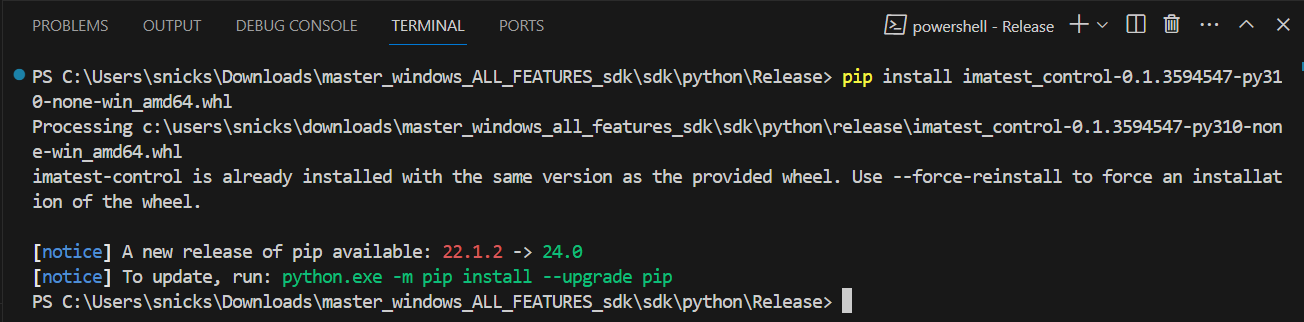
The Python API reference documents the controlAPI wheel package.
Right-click the Examples folder under Python and select Open in Integrated Terminal.
In that terminal, set the license code using an environment variable (see
Setting the license code), then run Basic_Example.py:
python Basic_Example.py
This runs a basic control script example. Other example files show device-specific functionality; use them together with the API reference to write scripts for your devices.
Communication ports
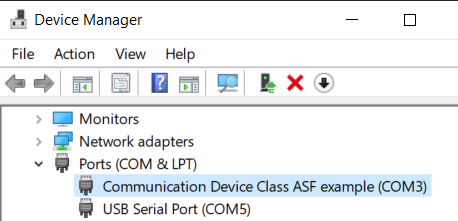
Some devices require a serial COM port to be specified from within your script. With the hardware device powered on, plug the USB from the control box into your computer, then find the COM port as below.
Windows. Open Device Manager to see which COM ports your computer is using, for example
COM3.
macOS. Open Terminal and list the serial USB devices:
ls /dev/tty.*
The serial ports look something like these:
/dev/tty.usbserial-AC01ZOSX
/dev/tty.usbmodem141101