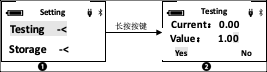
Triple click to enter the settings.
Click, then hold down one second to select testing
Hold down one second to select the Measurement coefficient submenu
In the coefficient setting interface, the initial value is 1 by default, and the user can modify it themselves. In the digital input state, click on the number where the cursor is located and add 1. After adding to 9, return to 0; long-press the button: the cursor will move one position to the left, then automatically jump back to the lowest position after reaching the highest, in a reciprocating cycle. Double-click the button to exit the data input state, the cursor selects "YES", and at this time, press and hold the button to complete the coefficient modification.
After selecting "YES", double-click the button to exit the coefficient modification interface and return to the main setting interface.
After selecting "YES" and clicking the button, the cursor jumps to the "NO" option. At this time, long press or double-click will exit the coefficient modification interface, return to the main setting interface, and discard the entered data.
Select the "NO" option and click the button to enter the digital input state again. The maximum coefficient can be set to 1000, and the minimum can be set to 0.01; as shown below: