Due to the root certificate authority for the updated Imatest.com SSL certificate not being present in the certificate stores in older releases of Imatest, the ability to activate a license was broken. When you attempt to activate, you receive errors such as the following:
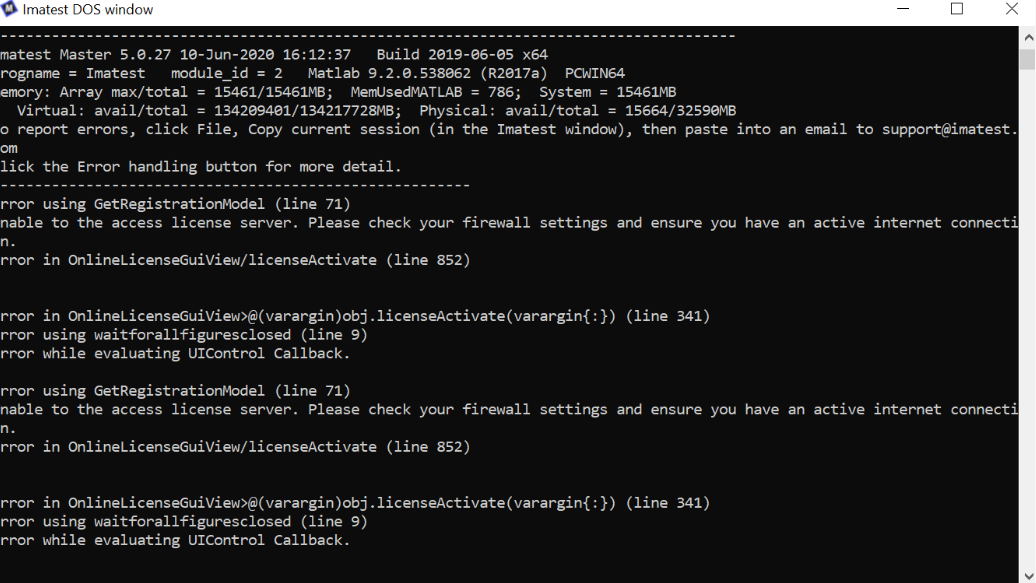
The solution is to import the new SSL certificate into the certificate store of the Java Runtime that is included in the MATLAB Runtime. We have produced a script for each operating system that will perform the import for all editions of the MATLAB Runtime on your machine. Please skip to the section relevant to your machine’s operating system and perform the listed tasks.
Linux
- Download this zip file (imatest_jre_cert_update_linux.zip)
- Extact the contents.
- Open a terminal window by right-clicking on the folder with the extracted contents and selecting ‘Open terminal here’.
- Run
./jre_cert_store_update.sh
macOS
- Download this zip file (imatest_jre_cert_update_macos.zip)
- Extract the contents.
- Open a terminal window by going to the Launchpad, search for ‘terminal’ and then click on the icon.
- In the terminal window, navigate to the extracted folder by running
cd ~/Downloads/imatest_jre_cert_update_macos
- Run
./jre_cert_store_update.sh
Windows
- Download this zip file (imatest_jre_cert_update_win64.zip)
- Extract the contents.
- Run jre_cert_store_update.bat by double-clicking on the file.
If the issue persists, please contact Imatest support.